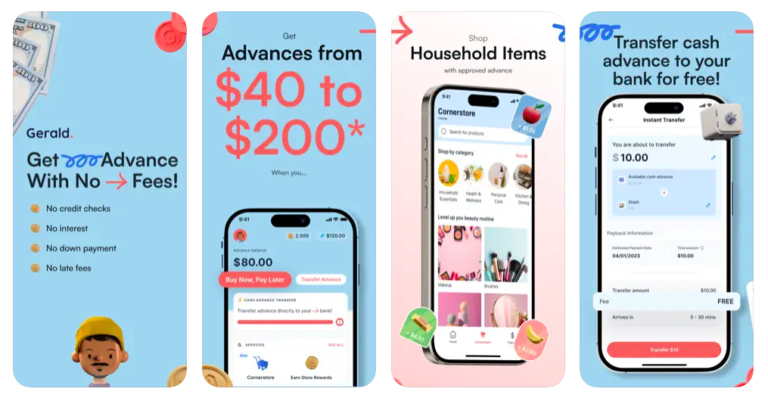

If you’ve been scrolling through the App Store or hunting for a quick cash advance to cover an unexpected bill, you’ve probably stumbled across the Gerald app.
The pitch is hard to resist: zero fees, zero interest, zero late charges. In a fintech landscape where most apps nickel-and-dime you with subscription fees, express transfer charges, and “optional” tips that aren’t really optional, Gerald’s promise of genuinely free cash advances sounds almost too good to be true.
So is it?
In this in-depth Gerald app review, we’re going to peel back the marketing language, look at how Gerald’s model actually works, dig into real Gerald complaints from users, and answer the question that actually matters: what does “free” really mean when Gerald says it?
And if the answer leaves you wanting more flexibility, we’ll introduce you to one alternative that might be a better fit.
What Is the Gerald Wallet?

Gerald (joingerald.com) is a financial technology app backed by Y Combinator that offers three core services packaged together:
- Buy Now, Pay Later (BNPL): for purchasing household essentials
- Cash Advance: transfer money to your bank account
- Mobile Plans: pay for your phone plan now, repay later
The Gerald wallet is the ecosystem that ties all of these together. Think of it less like a traditional banking app and more like a loyalty-rewards-meets-cash-advance hybrid.
The app positions itself squarely at people living paycheck to paycheck, specifically those who need $40 to $200 quickly to cover groceries, a utility bill, a tank of gas, or a birthday dinner. No credit check is required, and repayment is expected when your next paycheck hits.
On paper, this is a genuinely useful product for a population that’s chronically underserved by traditional banks.
How the Gerald Cash Advance Actually Works
Here’s where things get interesting, and where a lot of people are surprised when they read the fine print.
Gerald’s cash advance doesn’t work the way most people assume when they first download the app. You can’t simply sign up, connect your bank account, and immediately transfer $100 to cover a bill. There’s a prerequisite step baked into the model that determines whether Gerald is “free” in any meaningful sense for you specifically.
The unlock mechanic works like this:
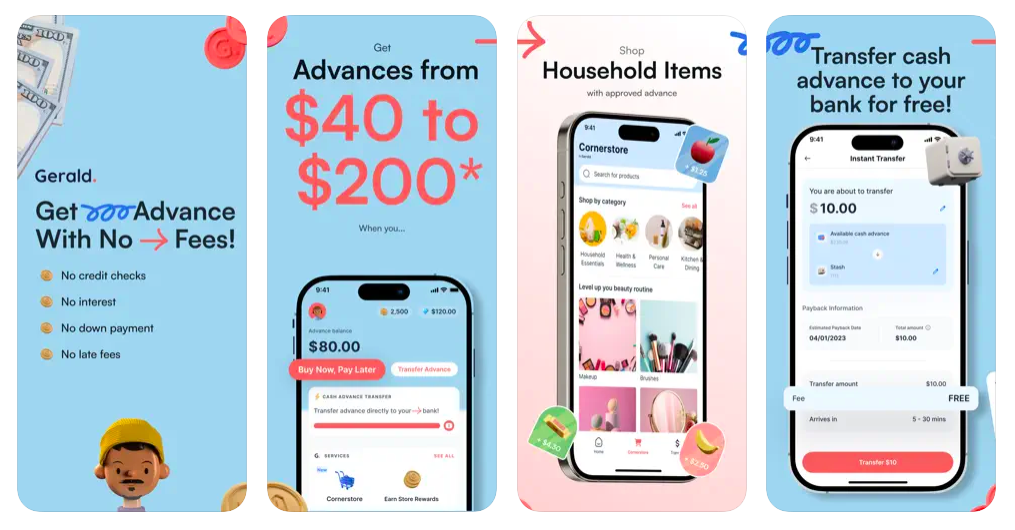
To access a free cash advance bank transfer, you must first use a portion of your advance to make a purchase on Cornerstore (Gerald’s proprietary in-app marketplace) or sign up for a Cranberry Mobile phone plan through the app. Once you hit that minimum spending threshold via the store, the remaining advance balance can be transferred to your bank, fee-free.
In plain terms: Gerald’s free cash advance is gated behind a shopping requirement.
This isn’t a hidden trap. Gerald discloses it in their footnotes, but it’s also not front-and-center on the homepage, and many users discover it only after downloading the app and expecting an immediate bank transfer.
This mechanic exists because it’s literally how Gerald makes money. Gerald earns revenue from its Cornerstore marketplace (similar to how an affiliate or retail model works) and from its Cranberry Mobile carrier partnership.
Because users generate revenue for Gerald when they shop or activate a phone plan, Gerald can afford to waive transfer fees entirely. The service is free to you because your shopping activity is the product.
This is actually a clever and relatively consumer-friendly model, far better than apps that charge $9.99/month or rake in $15 “express fees,” but it does mean that the utility of Gerald’s cash advance is tightly coupled to whether Cornerstore or Cranberry Mobile serves your actual needs.
Gerald Cash Advances
Before diving into user sentiment, let’s be concrete about what Gerald’s cash advance offers:
- Advance range: $40 to $200
- Interest: 0%
- Fees: $0
- Late charges: $0
- Credit check: None
- Repayment window: Typically tied to your next pay cycle; advances reassessed after repayment or 30 days if unused
- Eligibility: Not every user qualifies; Gerald uses its own approval criteria
- Debit card verification: Required; Gerald places a temporary hold of up to $1 that is released immediately
The $40–$200 range is worth noting. This is micro-advance territory, helpful for small shortfalls but not designed for covering a $600 emergency car repair or a month’s rent. If your financial gap is larger than $200, Gerald won’t be able to close it.
Real Gerald Complaints: What Users Are Saying
No Gerald app review would be complete without looking at actual user feedback. A scan of App Store reviews, Google Play comments, and Reddit threads reveals a mixed but telling picture.
The positives users consistently highlight:
- The no-fee promise is real. Users who engage with Cornerstore genuinely do receive cash advance transfers at zero cost.
- The app itself is clean and easy to navigate.
- The Play to Earn feature (where users play games or complete tasks to earn coins that convert into store rewards) is seen as a fun perk, especially for users who aren’t immediately eligible for advances.
- Customer support is generally rated as responsive.
The recurring Gerald complaints:
“I didn’t realize I had to shop first.” This is by far the most common source of frustration. Users expecting a straightforward bank transfer discover the Cornerstore requirement only after downloading. Many feel the marketing undersells this dependency.
“My advance limit is too low.” At a maximum of $200, Gerald frequently falls short for users dealing with mid-month emergencies that require more. For someone needing $400 to cover two overlapping bills, $200 just doesn’t move the needle.
“I wasn’t approved.” Gerald’s eligibility criteria remain somewhat opaque. Users who link their bank account and expect instant approval are sometimes denied without a clear explanation, which is frustrating for people who need money urgently.
“Cornerstore doesn’t have what I need.” Some users live in areas or have needs that don’t align well with what Cornerstore stocks, making the BNPL portion of the platform feel less useful. If you need a specific brand or item that isn’t carried, the gateway to your cash advance feels like a forced detour.
“The $200 ceiling is a deal-breaker.” Repeated enough times to be its own category. For users with larger gaps, Gerald becomes a partial solution at best.
None of these are fatal flaws. They’re the natural consequence of a narrowly scoped product. Gerald is built for small, frequent cash needs tied to household essentials. If your needs fit that description, it works exactly as advertised. If they don’t, you’ll feel constrained quickly.
6 Best Apps Like Gerald Cash Advance
| App Name | Max Advance | Monthly Fee | Tips/Optional Costs | Key Features | Best For |
| Beem | Up to $1,000 | None | Optional tips | Bill payment integration, no employment verification | Consolidating bill payments with advances |
| Dave | upto $500 | $5/month | Optional tips | Banking component, overdraft protection, side hustle marketplace | Quick transfers without prerequisites |
| Earnin | Up to current earnings | None | Optional tips | Real-time earned wage calculation, unlimited frequency, gig-friendly | Hourly employees and gig workers |
| Brigit | $250 | $9.99/month | Optional tips | Credit monitoring, fee prediction, budgeting tools | Credit building and financial wellness |
| MoneyLion | $500 (premium) | $19.99/month | Optional tips | Investment accounts, financial planning, insurance products | Comprehensive financial platform |
| Chime SpotMe | $200 | None (Chime required) | Optional tips | Instant integration, SpotMe Boost feature, automatic application | Seamless experience for Chime users |
| Gerald | Up to purchase value | None | Optional tips (primary revenue) | Marketplace integration, instant rewards, purchase-linked advances | Getting rewards while advancing cash |
The Gerald cash advance model is genuinely one of the more innovative in the space, but it’s far from alone.
The broader ecosystem of apps like Gerald cash advance includes a spectrum of approaches, each with its own trade-offs:
1. Beem
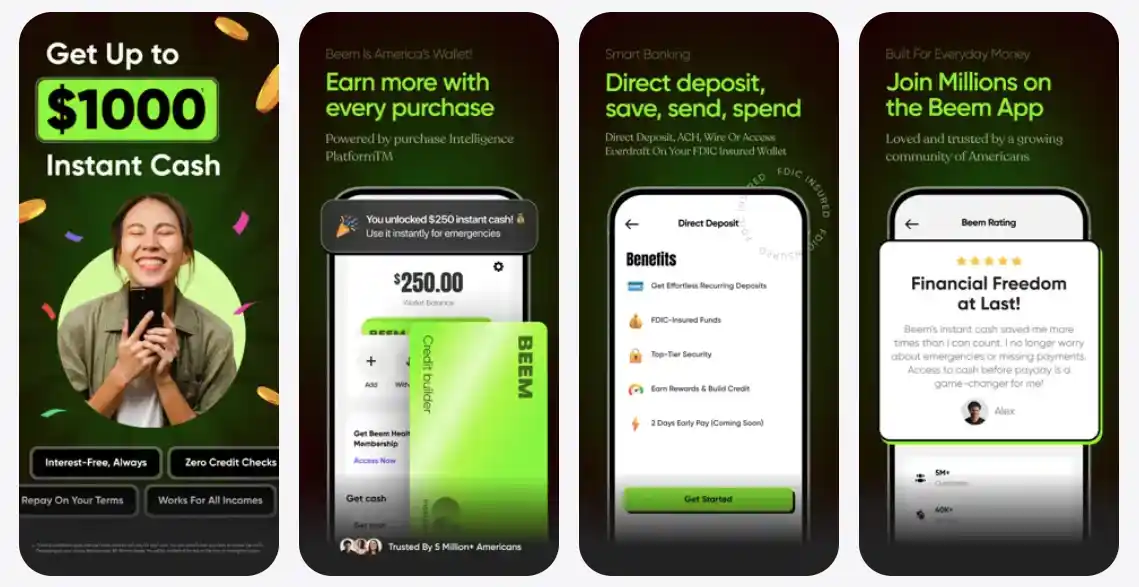
Beem is a mobile financial app that combines bill payment services with cash advance functionality. It’s designed to help users manage bills and get quick cash when needed. Here’s what you need to know:
How It Works:
- Offers cash advances up to $1,000
- No monthly subscription fee required
- Money is transferred to your bank account quickly
- You repay the advance through your paycheck
- Tips are optional (not mandatory)
Comparison to Beem vs Gerald:
- Beem has no monthly fee; Gerald is free but tips-dependent
- Beem emphasizes paying specific bills; Gerald uses marketplace rewards
- Both avoid traditional credit checks and predatory fees
Comparison to Beem vs Dave:
- Beem has no monthly fee ($0); Dave charges $1/month
- Beem specializes in cash advance; Dave is more general purpose
2. Dave
Dave is a mobile cash advance and financial services app that allows users to borrow money quickly to cover expenses before payday. Here’s what you need to know:
How It Works:
- Offers advances up to $500 with upto $5/month membership fee
- Money is transferred directly to your bank account
- You repay the advance from your next paycheck
- Faster turnaround time compared to traditional payday loans
Key Features:
- ExtraCash: Advance up to $500 without needing a purchase prerequisite (unlike Gerald)
- SpotMe: Overdraft protection feature that covers overdrafts up to a certain limit
- Side Hustle Marketplace: Built-in opportunities to earn extra money through gigs and tasks
- Banking Components: Includes savings tools and financial wellness features
- Tips System: While the $5/month fee is low, tips are optional but encouraged as additional revenue
Monetization Model:
- Primary revenue comes from the $1/month subscription fee
- Tips from users are encouraged but not required
- Partnerships and financial product integrations
Best For:
- Users who need quick cash without prerequisites
- People wanting lower fees than traditional payday loans
- Those looking for a comprehensive financial app with multiple features
- Anyone wanting optional tips rather than mandatory charges
Dave is one of the most popular cash advance apps alongside Earnin and Brigit.
3. EarnIn
Pulls from hours you’ve already worked rather than a pre-set advance. No fees, but tips are prominently encouraged. Works best for traditional, hourly employees with consistent scheduling.
The app uses innovative technology to calculate earned wages in real-time, which is genuinely useful for gig workers and contractors. Offers cash advances up to your current pay period earnings, with unlimited frequency.
4. Brigit
Subscription-based ($9.99/month) with advances up to $250 and credit monitoring built in. Higher ceiling than Gerald but has a monthly cost. Offers additional financial wellness tools including fee prediction (alerts you when you might overdraft) and budgeting features.
The credit monitoring element adds value beyond just the cash advance function, making it better for users focused on building credit.
5. MoneyLion
Broader banking suite with advances up to $500 for premium members ($19.99/month), investment accounts, and credit builder features. More robust than single-function competitors, but also more complex.
Includes portfolio management, financial planning tools, and insurance products. Better for users who want a comprehensive financial platform rather than just a cash advance solution.
6.Chime SpotMe
Overdraft protection up to $200 for Chime account holders, automatically applied. Zero fees but requires you to bank exclusively with Chime. The seamless integration means advances happen instantly without even opening another app.
Also offers SpotMe Boost feature that can increase your limit if you set up direct deposit. Best for users already comfortable with online-only banking and who want the most frictionless experience.
Gerald Cash Advance Alternatives: Is There a Better Fit?
If Gerald’s model works for you (if you regularly shop for household essentials and don’t need more than $200), then it’s a legitimately good product. The no-fee promise is real, the app is clean, and the Play to Earn rewards are a nice bonus.
But if you find yourself bumping against any of Gerald’s limitations, such as the shopping prerequisite, the $200 ceiling, or the narrow eligibility criteria, it might be time to consider Gerald cash advance alternatives that are built differently.
One that stands out in a meaningful way is Beem (trybeem.com).
Why Beem Is Worth a Look
Beem positions itself as “America’s Wallet,” a more trusted financial platform designed for gig workers, freelancers, and anyone whose income doesn’t fit a neat bi-weekly paycheck schedule.
Its centerpiece feature is called Everdraft™, a proprietary AI-powered cash advance engine that works quite differently from Gerald’s model.
Rather than requiring you to shop in a specific marketplace first, Beem’s Everdraft™ analyzes your bank account in real time, including your balance, income patterns, transaction history, and spending behavior, and determines your advance eligibility based on your actual financial picture.
If you qualify, you can request an advance and have it transferred to your bank account directly. No prior purchase required.
The advance range is also significantly broader: $5 to $1,000, compared to Gerald’s $40–$200. For someone facing a larger emergency like a medical copay, a car repair, or a utility disconnect notice, that ceiling matters enormously.
But Beem isn’t just a cash advance app. It’s a more fully realized financial platform that includes:
AI-Powered Financial Assistants: Beem includes BudgetGPT, DealsGPT, JobsGPT, and PriceGPT, which are intelligent agents that help you track spending, find deals, look for income opportunities, and monitor prices. For users who want to build better financial habits alongside emergency access to cash, these tools offer genuine long-term value.
Beem Credit Builder Card: Unlike Gerald, which doesn’t offer any credit-building mechanism, Beem includes a Credit Builder Card that reports positive payment activity to credit bureaus. Over time, consistent use can meaningfully improve your FICO score, effectively turning a short-term cash advance tool into a long-term financial improvement vehicle.
Peer-to-Peer Money Transfers: Send money to friends and family directly through the app.
Flexible Repayment: One of the more user-friendly aspects of Everdraft™ is that repayment is triggered by income inflows into your linked account, not by a hard due date. This is particularly useful for gig workers or freelancers whose income arrives irregularly.
The trade-off compared to Gerald? Beem uses a subscription model (plans start at around $1.97/month for Plus) to fund the platform rather than a marketplace shopping requirement.
Whether a small monthly fee or a shopping prerequisite feels more acceptable to you depends entirely on your situation.
For users who need larger advances, don’t want to shop in a specific store, or want the added benefit of credit building and AI financial tools, Beem’s subscription cost is easy to justify.
Gerald vs. Beem: A Practical Summary
| Feature | Gerald | Beem |
| Advance Range | $40–$200 | $5–$1,000 |
| Fees | $0 (after Cornerstore purchase) | Free |
| Shopping Prerequisite | Yes (Cornerstore or Cranberry Mobile) | No |
| Credit Check | No | No |
| Credit Building | No | Yes (Credit Builder Card) |
| AI Financial Tools | No | Yes (BudgetGPT, DealsGPT, etc.) |
| Flexible Repayment | Pay cycle-based | Income inflow-based |
| Mobile Plans | Yes (Cranberry Mobile) | No |
| Best For | Small household shortfalls | Larger emergencies, gig workers |
The Bottom Line on Gerald’s “Free”
So, back to the original question. Is Gerald’s cash advance really free?
Yes, technically. You won’t pay a transfer fee, an interest charge, or a late penalty. In that specific, literal sense, Gerald delivers on its promise.
But “free” doesn’t mean “unconditional.” The real cost of Gerald’s cash advance is behavioral: you need to engage with their ecosystem by buying something from Cornerstore or activating a Cranberry Mobile plan before you can move money to your bank.
If that requirement aligns with your existing habits, Gerald is a genuinely excellent product. If it doesn’t, you may find yourself jumping through hoops for a $100 transfer when what you actually needed was quick, flexible access to cash.
The Gerald wallet works best for people who regularly buy household essentials and occasionally need a small bridge to their next paycheck. For that person, it’s one of the most consumer-friendly cash advance tools available.
For everyone else, including gig workers with irregular income, people facing larger emergencies, and users who want to actively build their credit while accessing cash advances, a more flexible platform like Beem deserves a serious look.
The fintech space has finally started building tools that actually respect the user. Both Gerald and Beem are part of that shift. The question is just which one fits your life, and knowing what “free” really means is the first step to answering that honestly.
Disclaimer: This article is for informational purposes only and does not constitute financial advice. Always review the terms and conditions of any financial product before signing up.