
Table of Contents
If you are trying to figure out how to get a refund on Roblox after an accidental purchase or an unauthorized charge, you are not alone. Millions of players – from parents managing their kids’ accounts to college students who went a little overboard on Robux – run into this exact situation every year.
The good news? A refund is genuinely possible in certain situations. The catch? Roblox’s refund policy is fairly limited by design. But there are real steps you can take right now, and this guide walks you through every single one of them.
Does Roblox Actually Give Refunds?
Roblox does offer refunds, but only under specific conditions. The platform does not have a blanket refund policy. Most in-game purchases – including Robux, avatar items, and game passes – are treated as final sale once completed. However, Roblox may approve refunds in these cases:
- Accidental or unauthorized purchases
- Purchases made by a minor without parental permission
- Billing errors or duplicate charges
- Technical issues that prevented access to purchased content
If your situation fits any of these, you have a legitimate shot at getting your money back.
How to Get a Refund on Roblox (Step-by-Step)
Here is the most direct path to submitting a Roblox refund request.
Step 1: Head to Roblox Support
Go to roblox.com/support and log in to the account that made the purchase. This is important – you need to be logged in as the account holder, or as the parent or guardian for a child’s account.
Step 2: Choose the Right Issue Category
Under “Type of help needed,” select “Billing” and then choose the most relevant sub-option – typically “Unauthorized Purchase” or “Accidental Purchase.”
Step 3: Fill Out the Refund Request Form
In the description field, be specific. Include the following:
- The exact date of the purchase
- The amount charged
- The item or product purchased
- A clear reason for the refund request – unauthorized use, accidental purchase, or billing error
If a child made the purchase without parental knowledge, state that clearly in your message. It strengthens your case.
Step 4: Wait for the Response
Roblox typically responds within a few business days. If approved, the refund goes back to your original payment method. If denied, there are still other routes to explore.
Can You Get a Refund on Robux?
This is where most people get stuck. Robux – Roblox’s in-game currency – is generally non-refundable once purchased. Once you use Robux to buy an in-game item, that transaction is considered final.
That said, if the Robux was purchased but not yet spent, your chances of a refund are meaningfully better – especially in cases of unauthorized account access or accidental purchase. The key is to act fast and report the issue before any Robux is used.
What Is Roblox’s Official Refund Policy?
Roblox’s refund policy is limited by design. Here is a clear breakdown of what qualifies and what does not:
Eligible for a refund:
- Unauthorized charges due to account compromise
- Accidental purchases made by minors
- Duplicate charges or confirmed billing errors
- Robux purchased but not yet used (case-by-case)
Not eligible for a refund:
- Robux already spent on items, passes, or upgrades
- Virtual items or clothing once equipped or used
- Roblox Premium subscription after the billing cycle starts
- Purchases made more than 30 days ago (in most cases)
What to Do If Roblox Denies Your Refund
A denial is not always the end of the road. Here are two solid fallback paths.
Dispute Through Your Bank or Card Issuer
If Roblox denies your request and you believe the charge was unauthorized, you can file a chargeback through your bank or credit card company. This tends to work well for:
- Charges you did not authorize
- Charges made via a compromised account or stolen card
- Duplicate or incorrect charges
Hold on to all documentation – the Roblox support ticket number, purchase receipts, and any email communication. You will likely need it.
Request a Refund Through the App Store
If the Roblox purchase went through Apple (App Store) or Google Play, you may be able to get a refund directly through those platforms – even if Roblox said no.
For Apple: Go to reportaproblem.apple.com, locate the transaction, and click “Request a Refund.”
For Google Play: Open the Play Store, go to Order History, find the purchase, and select “Request a Refund.”
Both platforms are notably more accommodating when minors or accidental purchases are involved.
Common Roblox Purchases and Refund Chances
| Purchase Type | Refund Possible? | Notes |
| Robux (not yet spent) | Yes – case-by-case | Act fast, before spending |
| Robux (already spent) | Rare | Very limited chances |
| Avatar items | Unlikely | Final sale in most cases |
| Game Passes | Unlikely | Non-refundable by policy |
| Roblox Premium | Possible | If not accessed yet |
| Gift Cards | No | Non-refundable once redeemed |
What to Do When You Need Fast Cash While Waiting for a Refund
Waiting for a refund to process can take anywhere from a few days to a couple of weeks. If that money was already earmarked for rent, groceries, or bills, the gap can feel genuinely stressful – especially when it was not your mistake to begin with.
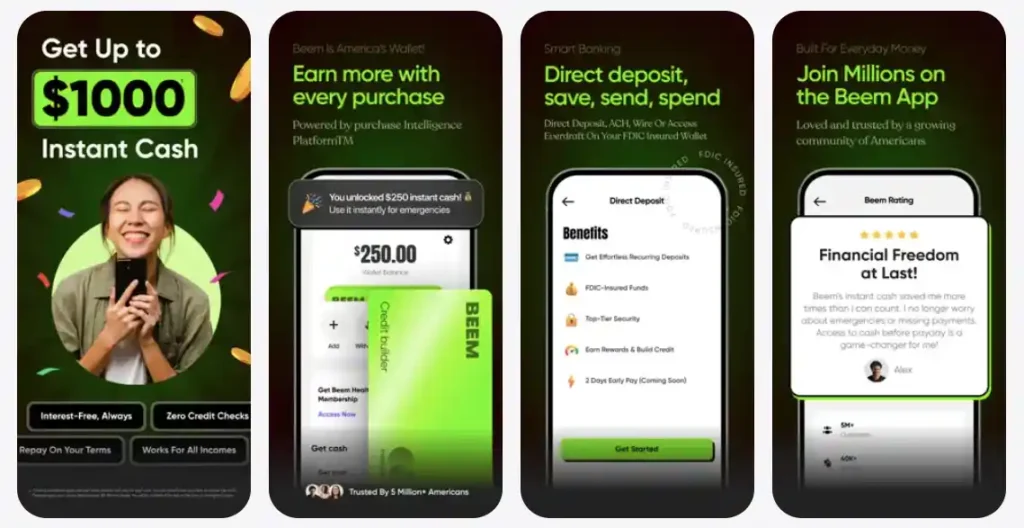
That is exactly the kind of short-term cash shortfall Beem was built for. With Everdraft, you can access up to $1,000 instantly – no credit check, no interest, and no late fees. It is not a loan. It is early access to your own money when you need it most.
And if you are tired of unexpected in-app charges throwing off your monthly budget, BudgetGPT – Beem’s AI-powered budgeting tool – helps you track every dollar, set smart spending alerts, and stay ahead of surprise expenses before they hit.
Tips to Prevent Unauthorized Roblox Charges
Once this is resolved, set up a few guardrails so it does not happen again.
- Enable parental controls: Roblox has built-in purchase restrictions that require parental approval before anything is bought.
- Use a prepaid card for gaming: Load a set amount each month so spending is naturally capped.
- Remove saved payment methods: Taking your card off the account adds a layer of friction that prevents impulse or accidental purchases.
- Set up purchase notifications: Most banks and card issuers offer instant transaction alerts via SMS or app push notifications.
- Use BudgetGPT: Beem’s budgeting tool lets you set category limits, including gaming and subscriptions, so nothing sneaks up on you at the end of the month.
Check out Beem for on-point financial insights and recommendations to spend, save, plan and protect your money like an expert. Download the Beem app today!
Frequently Asked Questions
Can I get a refund on Roblox if my child made unauthorized purchases?
Yes, and this is one of the stronger cases for a Roblox refund approval. Go to Roblox Support, select “Unauthorized Purchase,” and clearly explain that a minor made the purchase without parental consent. If Roblox denies it, escalate through your bank or the App Store.
How long does a Roblox refund take to process?
Roblox typically responds within 3 to 5 business days. If approved, the refund can take an additional 5 to 10 business days to show up on your statement, depending on your bank or card issuer.
Can I get a refund on Roblox Premium?
Roblox Premium refunds are possible if you request one before the billing cycle ends and have not yet accessed any premium features. Once the cycle is underway and features have been used, approval becomes significantly harder.
What happens if Roblox refuses my refund request?
You can escalate to your bank for a chargeback or go through Apple or Google Play if the purchase was made through their platforms. A clear paper trail – including purchase dates, amounts, and your Roblox support ticket – strengthens your case considerably.
Can I get a refund on a Roblox gift card?
Roblox gift cards are non-refundable once redeemed. If the card was redeemed but the Robux has not been spent yet, it is worth contacting Roblox support – though approvals in this case are rare.