

Table of Contents
Cash is becoming the exception rather than the rule at checkout. Whether you are tapping your phone at a coffee shop, scanning a QR code to split a dinner bill, or holding a stablecoin balance for cross-border transfers, all of it routes through the same piece of technology: a digital wallet. What started as a simple way to store a virtual debit card has grown into something closer to a financial command center, one that now touches everything from loyalty points to tokenized assets.
If you have not looked closely at how digital wallets work since you first downloaded one, a lot has changed. This guide breaks down what a digital wallet actually is in 2026, how it works under the hood, the new categories reshaping the space, and how to use one safely no matter which app you choose.
What Is a Digital Wallet?
A digital wallet, sometimes called an e-wallet, is an app or platform that stores your payment information securely so you can pay without physically handing over a card or cash. Instead of carrying a wallet full of plastic, you store encrypted versions of your debit cards, credit cards, and increasingly your identification, loyalty programs, and even digital currency, all inside one app on your phone or smartwatch.
The core idea has not changed since digital wallets first went mainstream: replace the physical card with a secure digital stand-in. What has changed is how much else that stand-in can now do.
From Payment Tool to Financial Hub
In 2026, the leading wallets no longer function as single-purpose payment apps. They have evolved into broader financial hubs that combine spending, saving, identity verification, and even basic investing in a single interface. Industry analysts describe this shift as the wallet becoming a super-app, where a single login gives you access to payments, peer-to-peer transfers, bill pay, and, increasingly, tokenized assets like stablecoins, all without switching between separate apps.
This matters for everyday users because it changes what you should expect from a wallet. A modern digital wallet is not just judged on whether it can tap and pay. It is judged on how well it consolidates your financial life without compromising security.
Also Read: How to Send Money From Cash App to Apple Pay (2026 Guide)
How Does a Digital Wallet Work?
At a technical level, a digital wallet does not store your actual card number the way a physical card does. Instead, it uses a process called tokenization, which replaces your real card details with a randomly generated token that is worthless if intercepted. When you tap to pay, the wallet sends this token, along with a one-time cryptographic code, to the merchant’s payment terminal. The merchant’s system passes that token to the payment network, which matches it back to your real card details on a secure server, never exposing the actual number during the transaction.
Near Field Communication and Contactless Payments
Most in-person digital wallet payments rely on Near Field Communication, or NFC, a short-range wireless technology that activates when your phone or smartwatch is held close to a compatible terminal. The entire exchange happens in a fraction of a second, which is why tap-to-pay transactions feel instantaneous compared to inserting or swiping a physical card.
QR Code and In-App Payments
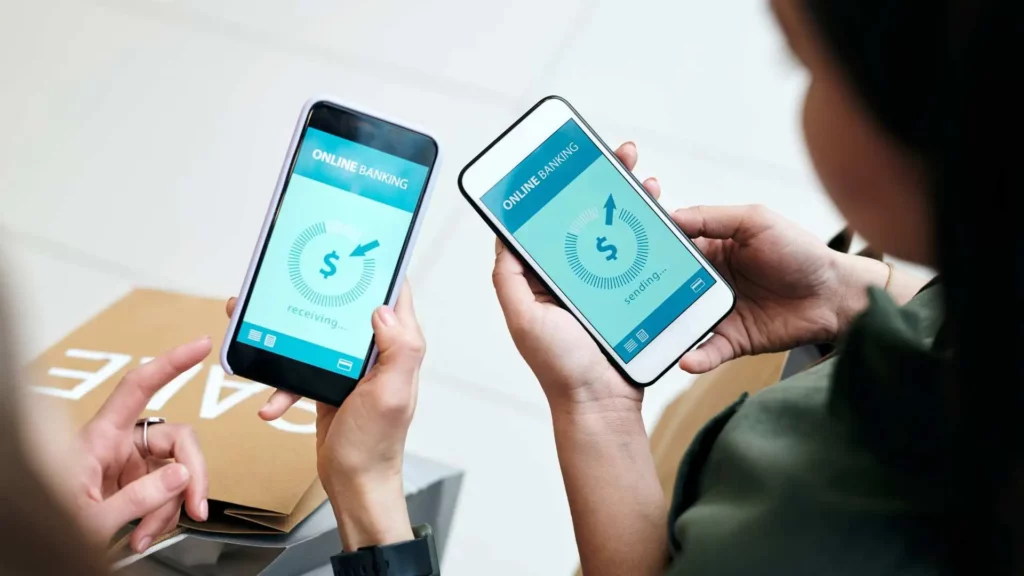
Not every digital wallet transaction relies on NFC. In many parts of the world, and increasingly in app-based checkouts in the United States, QR code payments dominate. The merchant displays a code, you scan it with your wallet app, and the payment is authorized and processed without any physical contact between devices. This method has become especially common for peer-to-peer transfers, small-business payments, and markets where merchant hardware upgrades roll out more slowly.
Authentication and Security Layers
Every digital wallet transaction is gated behind some form of authentication. This might be a fingerprint, facial recognition, a passcode, or, in newer implementations, multi-biometric verification that combines multiple factors before approving higher-value transactions. This layered approach is part of why digital wallets are generally considered safer than physical cards: even if someone steals your phone, they still need to bypass the authentication layer to use any stored payment method.
The Main Types of Digital Wallets in 2026
The digital wallet landscape has split into several distinct categories, each built for a different use case. Understanding which type you are dealing with helps you choose the right tool for the right job.
Mobile Payment Wallets
This is the category most people think of first: Apple Pay, Google Pay, and Samsung Pay. These wallets are closely tied to your phone’s operating system and are built primarily for tap-to-pay transactions at physical retailers, as well as in-app and online checkout. They remain the default choice for most everyday spending because of how deeply integrated they are with device hardware and biometric security.
Peer-to-Peer and Social Payment Wallets
Apps like PayPal, Cash App, and Venmo occupy a slightly different lane. These wallets are built around moving money between people quickly, splitting expenses, and increasingly offering their own branded debit cards and savings features. Many now also support sending money internationally, an area that has grown more competitive as cross-border stablecoin rails make transfers faster and cheaper than traditional wire transfers.
Stablecoin and Tokenized Asset Wallets
This is the category that has expanded the most heading into 2026. Stablecoins, digital tokens pegged to a stable asset like the US dollar, have moved from a niche crypto product into something banks and fintech platforms are actively building around. Industry research suggests a majority of users would open a stablecoin wallet if their existing bank or financial app offered one, largely because of practical benefits like faster cross-border transfers, lower fees, and the ability to settle payments outside normal banking hours.
These wallets work differently under the hood than a traditional mobile wallet. Instead of simply tokenizing a card number, they manage actual blockchain-based balances, track which network or chain an asset lives on, and increasingly abstract away technical complexity so users do not need to understand blockchain mechanics just to send money.
Identity and Document Wallets
A growing number of digital wallets now store more than payment methods. Driver’s licenses, boarding passes, hotel reservations, event tickets, gift cards, and loyalty program cards have all moved into wallet apps. Some states and countries have begun rolling out digital identification that lives directly inside a phone’s wallet app, allowing it to be used for age verification or identity checks in addition to travel and payments.
Beem Digital Wallet App makes digital payments simpler, faster, and more convenient. It offers users an easy way to manage everyday transactions, making cashless payments a seamless part of their daily lives. Download the Beem app now!
Also Read: How to Send Money to Friends and Family in 2026
How to Set Up and Use a Digital Wallet
Getting started with a digital wallet is straightforward, though the specific steps vary slightly depending on which app you choose.
Choosing the Right Wallet for Your Needs
The best digital wallet depends heavily on your device, location, and what you plan to use it for. iPhone users typically default to Apple Pay because of its tight integration with the device. Android users often lean toward Google Pay or Samsung Pay for similar reasons. If you need to send money to friends, split bills, or want a standalone account not tied to your phone’s operating system, PayPal, Cash App, or Venmo fill that role. If your priority is international transfers or maintaining a stable digital asset balance, a stablecoin-enabled wallet from a fintech provider may be worth exploring, though it is important to understand the underlying technology before moving significant funds.
Adding a Payment Method
Once you have selected a wallet, you will need to add your card details, either by entering them manually or scanning the card with your phone’s camera. The wallet then sends this information to your card issuer for verification before tokenizing it for use. This process usually takes only a minute or two, though some banks require an additional verification step, such as a text-message code, before the card becomes active in the wallet.
Making a Contactless Payment
To pay in person, unlock your phone using your set authentication method, hold it near the contactless symbol at checkout, and wait for the confirmation buzz or chime. Some terminals may prompt for a PIN on higher-value transactions as an additional security measure. Not every retailer has upgraded its terminals to accept tap-to-pay, so it is worth keeping a backup payment method on hand.
Sending Money to Another Person
For peer-to-peer transfers, you typically enter the recipient’s phone number, email, or username inside the app, specify an amount, and confirm with your authentication method. Transfers between users of the same wallet app are usually instant, while transfers to a different platform or to a bank account can take anywhere from a few seconds to a couple of business days depending on the service and whether you opt for an instant transfer fee.
Is It Safe to Use a Digital Wallet?
Security remains one of the biggest reasons people hesitate to switch from physical cards, even though the data tells a different story. Because digital wallets rely on tokenization rather than transmitting your actual card number, a stolen or intercepted transaction reveals nothing useful to a bad actor. The token is meaningless outside the specific transaction for which it was generated.
Why Tokenization Matters More Than Encryption Alone
Encryption protects data in transit, but tokenization goes a step further by ensuring the sensitive data never travels in the first place. Your real card number stays with the card issuer’s secure servers. Even if a hacker intercepted a wallet transaction, they would only capture a token tied to that single purchase, not a reusable card number.
Biometric Authentication as a Second Layer
Modern wallets layer biometric authentication, such as fingerprint or facial recognition, on top of tokenization. This means a thief would need both your unlocked phone and a way to bypass biometric security before they could authorize a single fraudulent payment, a much higher bar than simply stealing a physical card and signing a receipt.
Even with strong built-in security, a few habits make digital wallets meaningfully safer.
- Set up remote lock and wipe capability on your phone in case it is lost.
- Avoid storing payment methods on devices without a passcode or biometric lock enabled.
- Review transaction notifications regularly rather than only checking statements monthly, since most wallets send instant alerts, making it easy to catch unauthorized activity early.
- If you start using a stablecoin or crypto-linked wallet, take time to understand custody, meaning whether the platform holds your assets on your behalf or whether you control the private keys directly, since this affects what protections apply if the platform fails.
What Else Can a Digital Wallet Do Beyond Payments?
Beyond simply replacing your physical cards, digital wallets have become a catch-all for documents and credentials you used to carry separately. Boarding passes, concert tickets, hotel confirmations, gift cards, and loyalty rewards programs can all live inside the same app you use to pay for coffee. Some wallets now also support storing verifiable digital identity credentials, a trend that regulators in multiple regions are actively standardizing as digital identification becomes more common for both travel and age verification.
This consolidation is convenient, but it also means a single wallet app increasingly holds a meaningful slice of your financial and personal life. That is worth keeping in mind when deciding how many features to enable and which permissions to grant.
Final Thoughts: What to Look for in a Digital Wallet in 2026
A digital wallet in 2026 is no longer just a place to store a virtual debit card. It is closer to a personal financial control center that handles everyday spending, peer-to-peer transfers, travel documents, loyalty rewards, and, for a growing number of users, tokenized digital assets like stablecoins. The underlying technology, tokenization paired with biometric authentication, remains the reason these tools are generally considered safer than carrying physical cards, even as the features built on top of that foundation keep expanding.
Choosing the right wallet comes down to matching the tool to your actual habits: a mobile-first wallet for everyday tap-to-pay, a peer-to-peer app for splitting costs with friends, and a stablecoin-enabled option if cross-border transfers or digital asset exposure matter to you. Whichever combination you land on, the fundamentals of safe use stay the same: enable strong authentication, monitor your transactions, and understand exactly what each wallet does with your data before you hand it your financial life.
With its focus on convenience and easy digital transactions, Beem Digital Wallet App adds simplicity to everyday payments. It is a practical choice for users looking to embrace a smoother and more convenient digital payment experience.
FAQs About What Is a Digital Wallet
What is the difference between a digital wallet and a mobile banking app?
A digital wallet is primarily built to store payment methods and facilitate transactions, whether through tap-to-pay, QR codes, or peer-to-peer transfers. A mobile banking app, by contrast, is tied to a specific bank account and focuses on account management, such as checking balances, transferring funds between your own accounts, and depositing checks.
Can I use a digital wallet without a smartphone?
Most digital wallets are designed around smartphone or smartwatch hardware because they rely on NFC chips and biometric sensors built into those devices. Some standalone hardware wallets and physical contactless cards offer similar tap-to-pay functionality without a phone, but the broader ecosystem of features like peer-to-peer transfers, loyalty integration, and stablecoin support generally requires a smartphone app.
Are stablecoin wallets the same as cryptocurrency wallets?
Not exactly. A general cryptocurrency wallet can hold a wide range of digital assets, including volatile coins like Bitcoin or Ethereum. A stablecoin wallet is typically built specifically around tokens pegged to a stable asset, most commonly the US dollar, which makes them function more like a digital cash account than a speculative investment tool. Some platforms offer both within the same app, but the underlying purpose and risk profile differ significantly.
What happens if I lose my phone with a digital wallet installed?
Losing your phone does not automatically expose your payment information, since most wallets require biometric or passcode authentication before any transaction can be approved. Most operating systems also allow remote locking or wiping of a lost device. As a precaution, contact your card issuer or wallet provider to suspend the affected cards, and use your device manufacturer’s remote lock feature as soon as you notice the phone is missing.
Do digital wallets charge fees to use?
Adding a debit or credit card to a mobile payment wallet like Apple Pay or Google Pay typically does not carry an extra fee, since the wallet simply facilitates a transaction already covered by your card issuer’s terms. Peer-to-peer wallets and stablecoin platforms sometimes charge fees for instant transfers to a bank account, currency conversion, or expedited processing, so it is worth checking the specific fee schedule of whichever app you use before relying on it for frequent transfers.