

You downloaded a financial app months ago thinking it would solve your money problems. Maybe it did for a while. Maybe it never really delivered on its promises. Either way, you are now paying a monthly subscription for an app you barely use, and every time that charge hits your account, you feel a small sting of regret.
You are not alone. Millions of Americans are subscribed to financial apps they no longer need, no longer use, or never fully benefited from in the first place. The problem is that canceling these subscriptions is rarely as simple as signing up was.
Apps bury cancellation options deep in settings menus. Some require you to cancel through the App Store or Google Play rather than the app itself.
Others make you jump through hoops like contacting support, waiting for confirmation emails, or navigating confusing account management pages.
This guide gives you a clear, step-by-step process for canceling the most popular financial app subscriptions in 2026, and it also helps you evaluate whether the app you are about to cancel should be replaced with something better.
Why People Cancel Financial App Subscriptions
Before jumping into the how, it is worth understanding the why. People cancel financial app subscriptions for a variety of reasons, and recognizing your own reason can help you make a smarter decision about what comes next.
The most common reasons include the app charging fees that feel disproportionate to the value provided, limited cash advance amounts that do not actually solve the financial gap, income restrictions that lock out gig workers, freelancers, and government benefit recipients, lack of withdrawal flexibility (most apps only deposit to linked bank accounts and do not support Venmo or Cash App), missing features like credit building, budgeting tools, or financial protections, hidden charges that were not obvious during sign-up, and poor customer support when issues arise.
If any of these sound familiar, you are making the right call. But canceling without a plan leaves you without a safety net. The smarter move is to cancel what is not working and replace it with something that does.
How to Cancel Dave Subscription
Dave charges a $5/month membership fee for access to its ExtraCash advances.
Cancel Through the Dave App
Open the Dave app and tap on your profile icon. Navigate to “Settings” and look for “Membership” or “Subscription.” Tap “Cancel Membership” and follow the confirmation prompts. You should receive a confirmation email within 24 hours.
Cancel Through the App Store (iOS)
Open the Settings app on your iPhone. Tap your name at the top, then tap “Subscriptions.” Find Dave in the list and tap it. Tap “Cancel Subscription” and confirm.
Cancel Through Google Play (Android)
Open the Google Play Store app. Tap your profile icon, then “Payments & subscriptions,” then “Subscriptions.” Find Dave and tap “Cancel subscription.” Follow the prompts to confirm
How to Cancel Brigit Subscription
Brigit offers a free tier with limited features and a Plus plan that costs $9.99/month. The Plus plan gives you access to automatic advances up to $250. If you are paying for Plus and not getting enough value, here is how to cancel.
Cancel Through the Brigit App
Open the Brigit app and go to your Account settings. Tap “Subscription” or “Plan.” Select “Cancel Plus” or “Downgrade to Free.” Confirm your cancellation. Brigit may offer you a retention deal or discounted rate before finalizing.
Cancel Through the App Store or Google Play
Follow the same steps listed above for iOS or Android. Find Brigit in your subscriptions list and cancel from there. This is actually the more reliable method, because canceling within the app sometimes does not fully stop the billing if the subscription was initiated through the App Store or Google Play.
What You Lose When You Cancel Brigit
Canceling Brigit Plus removes access to automatic cash advances (up to $250), credit builder reporting, identity theft protection, and financial health insights. The $250 advance limit is significantly lower than what Beem offers through Everdraft™ (up to $1,000), and Brigit does not support Venmo or Cash App withdrawals.
How to Cancel EarnIn Subscription
Earnin does not technically charge a subscription fee, but it uses a “tip” model that strongly encourages users to tip for each advance. Many users feel pressured into tipping $5 to $14 per advance, which can add up to more than a traditional subscription. If you want to stop using Earnin entirely, here is what to do.
Delete Your EarnIn Account
Open the Earnin app and navigate to “Account” or “Settings.” Look for “Close Account” or “Delete Account.” Follow the prompts to confirm. Earnin may ask you to repay any outstanding advances before closing your account.
Important Notes About EarnIn
EarnIn is employer-linked, meaning it only works if your employer is in their network or if you have a consistent direct deposit schedule. It does not support gig income, freelance income, or government benefits.
Cash advances are limited to $100 per day and $750 per pay period. There is no option to withdraw to Venmo or Cash App. If any of these limitations prompted your decision to cancel, you are looking for something fundamentally different from what Earnin provides.
How to Cancel MoneyLion Subscription
MoneyLion offers multiple products, and its subscription pricing can be confusing. The core membership is free, but premium features like Credit Builder Plus and larger Instacash advances may require paid tiers. Here is how to cancel.
Cancel Through the MoneyLion App
Open the MoneyLion app and go to “Settings.” Navigate to “Membership” or “Subscription.” Select the plan you want to cancel and follow the cancellation prompts. If you have a Credit Builder loan, you may need to pay off the remaining balance before fully closing your account.
Cancel Through the App Store or Google Play
If your MoneyLion subscription was initiated through the App Store or Google Play, cancel from there using the same steps outlined earlier. This ensures the recurring billing stops even if the in-app cancellation does not process correctly.
What You Lose When You Cancel MoneyLion
Depending on your plan, canceling MoneyLion may remove access to Instacash advances (up to $500), Credit Builder Plus, investment features, and managed investing. MoneyLion requires credit checks for some features, has varying income requirements, and does not support Venmo or Cash App withdrawals for advances.
How to Cancel Cleo Subscription
Cleo offers a free tier and paid plans (Cleo Plus at $5.99/month and Cleo Builder at $14.99/month). If you are paying for Cleo and not getting enough value from its AI chat-based budgeting or cash advance features, here is how to cancel.
Cancel Through the Cleo App
Open the Cleo app and tap the gear icon or “Settings.” Navigate to “Subscription” or “Manage Plan.” Tap “Cancel” and confirm. Cleo will likely prompt you with retention offers before finalizing.
Cancel Through the App Store or Google Play
Find Cleo in your App Store or Google Play subscriptions and cancel from there. As with other apps, this is the safest way to ensure billing stops.
What You Lose When You Cancel Cleo
Canceling Cleo Plus or Builder removes access to cash advances (up to $250), salary advances, the credit builder tool, and Cleo’s AI budgeting chat. Cleo’s AI is conversational and entertaining, but it lacks the depth of dedicated tools like Beem’s BudgetGPT for budgeting, PriceGPT for price comparisons, and DealsGPT for deal discovery. Cleo also does not support Venmo or Cash App withdrawals.
How to Cancel Through Apple App Store (Universal Steps)
If you are unsure which financial app subscriptions you are currently paying for, you can view and manage all of them from one place on your iPhone.
Open the Settings app on your iPhone. Tap your name at the top of the screen. Tap “Subscriptions.” You will see a list of all active and expired subscriptions. Tap any active subscription to see details and cancel. Confirm the cancellation when prompted.
This method works for Dave, Brigit, MoneyLion, Cleo, Earnin, and virtually every other app-based subscription. It is also the best way to discover subscriptions you may have forgotten about.
How to Cancel Through Google Play Store (Universal Steps)
For Android users, the process is similarly centralized.
Open the Google Play Store app. Tap your profile icon in the top right. Tap “Payments & subscriptions.” Tap “Subscriptions.” Find the financial app you want to cancel and tap it. Tap “Cancel subscription” and follow the confirmation prompts.
This is the most reliable method for Android users because it stops billing at the platform level, regardless of whether the app’s internal cancellation process works correctly.
What to Do After Canceling: Do Not Leave a Gap in Your Financial Safety Net
Canceling a financial app subscription is the easy part. The harder question is what comes next. If you were using Dave, Brigit, EarnIn, or MoneyLion as a safety net for cash shortfalls, canceling without a replacement means you are one unexpected bill away from an overdraft fee or a missed payment.
This is where most people make a mistake. They cancel out of frustration, go a few weeks without a backup, hit a cash crunch, and end up downloading the same app again or turning to something worse like a payday loan.
The smarter move is to replace your current app with one that actually addresses the reasons you canceled in the first place.
Ask Yourself These Questions Before Choosing a Replacement
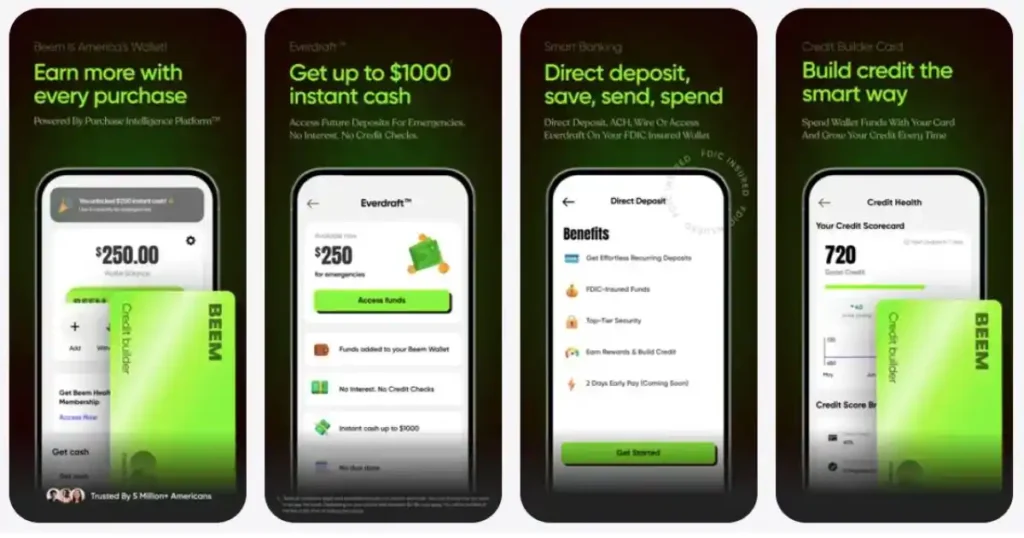
Did you cancel because the cash advance limit was too low? Look for an app that offers higher limits. Beem’s Everdraft™ provides up to $1,000.
Did you cancel because the app did not support your income type? If you are a gig worker earning through Uber, DoorDash, or Etsy, or if you receive government benefits like SSI, SSDI, or unemployment, you need an app with no income restrictions. Beem supports all of these.
Did you cancel because you could only withdraw to your bank account? If you need the flexibility to send your cash advance to Venmo or Cash App, Beem is one of the only apps that offers this.
Did you cancel because there were no budgeting or savings tools? Beem includes BudgetGPT, PriceGPT, DealsGPT, and cashback rewards.
Did you cancel because there was no protection for job loss or disability? Beem offers both job loss protection and disability protection, features that virtually no other cash advance app provides.
Did you cancel because of hidden fees or confusing pricing? Beem has no hidden fees, no interest on Everdraft™, and no mandatory tipping.
Beem vs the cash Apps You Are Canceling: A Side-by-Side Look
| Feature | Beem | Dave | Brigit | Earnin | MoneyLion | Cleo |
| Cash Advance Limit | Up to $1,000 | Up to $500 | Up to $250 | Up to $100/day | Up to $500 | Up to $250 |
| Monthly Fee | Transparent pricing | $5/month | $9.99/month (Plus) | “Tips” ($5-$14+) | Varies | $5.99-$14.99/month |
| Income Restrictions | None | Minimum required | Minimum required | Employer-linked | Varies | Minimum required |
| Gig/Freelance Income | Fully supported | Fully supported | Limited | Not supported | Limited | Limited |
| Government Benefits | Fully supported | NA | Not supported | Not supported | Not supported | Not supported |
| Withdraw to Venmo | Yes | – | No | No | No | No |
| Withdraw to Cash App | Yes | – | No | No | No | No |
| AI Budgeting Tool | BudgetGPT | Yes | No | No | No | Cleo AI (basic) |
| Price Comparison AI | PriceGPT | – | No | No | No | No |
| Deal Finder AI | DealsGPT | – | No | No | No | No |
| Job Search AI | JobsGPT | – | No | No | No | No |
| Credit Builder | Yes | – | Yes (paid) | No | Yes (paid) | Yes (paid) |
| Job Loss Protection | Yes | No | No | No | No | No |
| Disability Protection | Yes | No | No | No | No | No |
The comparison makes it clear. If you are canceling one of these apps because it was not doing enough, Beem fills every gap and then some.
How to Get Started with Beem After Canceling Your Old App
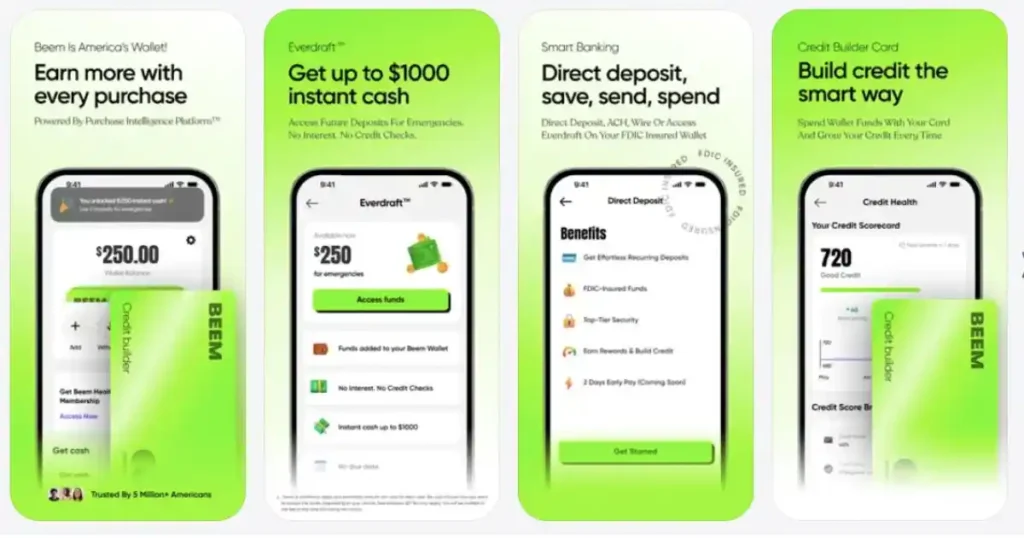
Switching to Beem takes less time than canceling most of the apps listed above. Download Beem from the App Store or Google Play. Create your account in under two minutes. Connect your income source.
Beem supports W-2 income, 1099 income, gig platform earnings (Uber, DoorDash, Lyft, Etsy, Instacart), freelance income, and government benefits (SSI, SSDI, unemployment, VA, SNAP).
Access Instant cash advance and request a cash advance up to $1,000 with no credit check, no interest, and no mandatory tips. Choose where to send your money: your bank account, Venmo, or Cash App.
Explore Full Access Mode to unlock higher limits, priority processing, the complete AI tool suite, enhanced cashback, credit building, and job loss and disability protection.
You cancel one app. You gain an entire financial platform.
People Also Ask: How to Cancel a Financial App Subscription
How do I cancel Brigit Plus?
Go to Account settings in the Brigit app, tap Subscription, and select Cancel Plus. For the most reliable cancellation, cancel through the App Store or Google Play subscriptions menu to ensure billing stops completely.
Can I cancel Earnin?
Earnin does not have a traditional subscription, but it uses a tipping model that can cost $5 to $14+ per advance. To stop using Earnin, navigate to Account settings and select Close Account or Delete Account.
How do I see all my app subscriptions in one place?
On iPhone, go to Settings, tap your name, and tap Subscriptions to see all active and expired subscriptions. On Android, open Google Play Store, tap your profile, then Payments & subscriptions, then Subscriptions.
Will I lose my cash advance access if I cancel?
Yes. Canceling your subscription to Dave, Brigit, MoneyLion, or Cleo will remove your access to their cash advance features. Make sure you have a replacement in place before canceling to avoid being caught without a safety net.
What is the best alternative after canceling a cash advance app?
Beem offers up to $1,000 in cash advances through Everdraft™ with no credit checks, no income restrictions, no hidden fees, and the ability to withdraw to Venmo or Cash App. It also includes AI financial tools, credit building, cashback, and job loss and disability protection.
Does canceling a financial app affect my credit score?
Canceling a financial app subscription does not directly affect your credit score. However, if you were using a credit builder feature (like Brigit’s or MoneyLion’s), stopping those payments could halt your credit building progress. Beem offers its own credit builder to continue building your score without interruption.
How do I avoid getting charged after canceling?
Always cancel through the App Store or Google Play subscriptions menu rather than just deleting the app. Deleting an app does not cancel the subscription, and you will continue to be billed until you formally cancel through the platform where you originally subscribed.
Disclaimer: The information provided in this article is for educational and informational purposes only and should not be considered financial advice. App features, subscription pricing, cancellation processes, and cash advance terms may change without notice. The details provided are accurate as of the time of writing and may not reflect the most current app versions or pricing. Beem is a fintech platform, not a bank. Banking services are provided through FDIC-insured partner banks. Always review the terms and conditions of any financial product before subscribing or canceling. If you are experiencing financial hardship, consider consulting a licensed financial advisor for personalized guidance.