

Table of Contents
Let’s get the bad news out of the way first: you cannot borrow money from Venmo. There is no “Venmo loan” button hiding in the app. There is no secret advanced feature that unlocks after a certain number of transactions.
Venmo is a payments platform, not a lender. It was built to split dinner tabs and pay rent, not to float you $300 until Friday.
Now here is the good news. You do not need Venmo itself to lend you money. You need cash advance apps that work with Venmo by depositing funds into accounts you can access through Venmo’s ecosystem. And in 2026, several of the best cash advance apps on the market do exactly that.
The trick is understanding how the money moves. Venmo now offers direct deposit and a debit card, which means it functions more like a bank account than the simple peer-to-peer app it started as.
Cash advance apps that deposit funds via routing and account numbers can send money directly to your Venmo account. Others deposit into a linked traditional bank, and from there, you transfer to Venmo in seconds. Either way, the money gets where you need it.
This guide covers five loan apps that work with Venmo, explains how each one delivers funds, and answers every variation of the “can I get my advance to Venmo” question that brings people to this page.
Can You Borrow Money From Venmo?
No, Venmo does not offer cash advances or personal loans. Unlike some payment platforms that have experimented with lending features, Venmo has not rolled out a borrowing product for general users.
If you are wondering, “Does Venmo do loans like Cash App?” the answer is similar: Cash App has a very limited Borrow feature ($20 to $200, not available to most users), and Venmo does not even offer that much. Neither platform is a reliable source for borrowing money.
However, Venmo does have infrastructure that cash advance apps can deposit into. Since Venmo introduced direct deposit, the app now provides:
- A routing number and account number (found in your Venmo app under Settings > Direct Deposit)
- A Venmo Debit Card that lets you spend your Venmo balance at any retailer
- Instant transfers between Venmo and linked bank accounts
This banking infrastructure enables cash advance apps that work with Venmo. When a cash advance app asks for your bank’s routing and account number, you can provide your Venmo numbers. The advance deposits directly into your Venmo balance, ready to spend with your Venmo debit card or transfer elsewhere.
Not every advanced app supports this seamlessly. Some require a “traditional” bank account and may reject Venmo’s routing numbers.
The five apps below have been selected specifically because their fund delivery methods are compatible with Venmo’s account structure or can be easily paired with it via quick transfers.
Venmo, known for its peer-to-peer payment system, has become a go-to platform for many. To get access to the cash advances in Venmo, Users can integrate this tool with cash advance apps, making transactions more fluid. So, let’s look at some of the most common advanced apps that work with Venmo.
5 Best Cash Advance Apps That Work With Venmo
1. Beem
Advance limit: Up to $1,000.
How funds reach Venmo: Direct deposit via Venmo routing/account numbers or deposit to a linked bank, then instant transfer to Venmo.
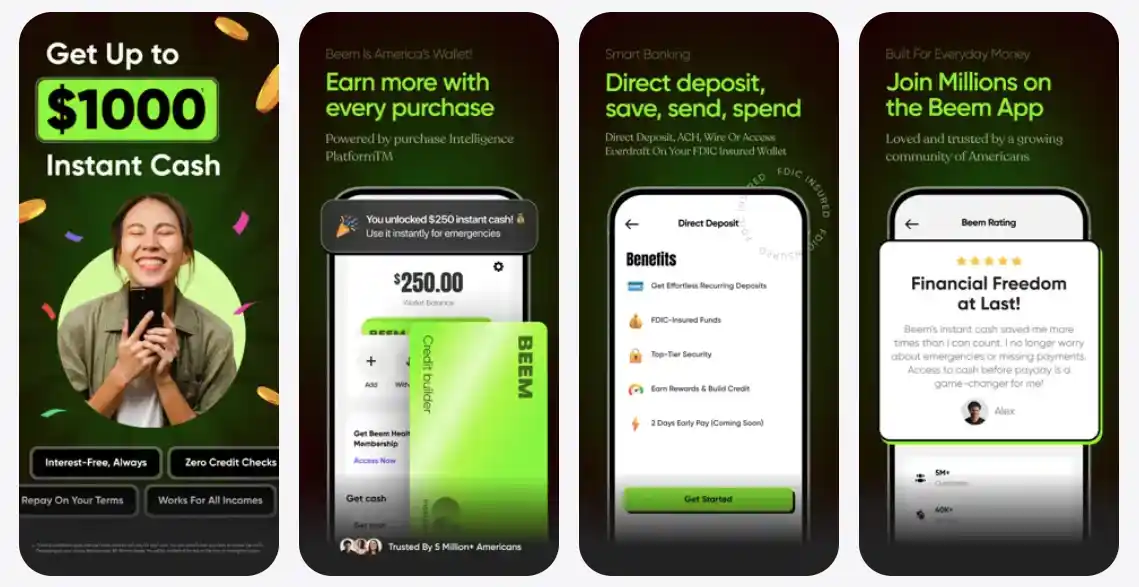
Beem’s Everdraft™ is the strongest option among cash advance apps that work with Venmo for one straightforward reason: it offers the highest advance limit on this list at up to $1,000 with zero interest.
That is four times what most competitors max out at, which matters when your car breaks down, or rent is due in 48 hours, and $250 is not going to cut it.
Getting funds to Venmo through Beem is simple. You can enter your Venmo direct deposit routing and account numbers when setting up your Beem account, allowing advances to land directly in your Venmo balance. Alternatively, receive the advance in your primary bank account and use Venmo’s instant transfer to move the funds over in minutes.
But the real reason Beem tops this list is what comes with the advance. BudgetGPT builds a personalized spending plan so you don’t need advances in the first place.
DealsGPT surfaces cashback and discounts on everyday purchases. PriceGPT compares prices so you never overpay at checkout. And JobsGPT connects you to income opportunities matched to your skills and location.
Among all the money-borrowing apps that work with Venmo, Beem is the only one that actively tries to get you out of the advance cycle entirely.
Why choose Beem with Venmo: Highest limit ($1,000), no interest, AI tools that address the root cause of living paycheck to paycheck, and multiple deposit paths to Venmo.
2. Cleo
Advance limit: Up to $250
How funds reach Venmo: Deposit to a linked bank account, then transfer to Venmo.
Does Cleo work with Venmo? Yes, with one step. Cleo deposits advances into your connected bank account, and you then transfer those funds to Venmo using the instant transfer feature. Cleo does not deposit directly into Venmo’s routing numbers, but the workaround takes about 30 seconds and costs nothing if you use Venmo’s standard transfer (or 1.75% if you use a different method).
Cleo is an AI-powered financial assistant that combines cash advances up to $250 with budgeting tools, spending insights, and a communication style that is unlike any other finance app on the market.
Cleo’s AI talks to you like a friend who has opinions about your $47 DoorDash habit. It roasts your spending. It celebrates when you save. It is genuinely engaging in a way that makes you actually open the app and pay attention to your budget, which is more than most payday loans that accept Venmo alternatives can claim.
Advances are available through Cleo Plus ($5.99/month) or Cleo Builder ($14.99/month, which includes credit-building). The free tier gives you access to Cleo’s budgeting chat and spending analysis, but not the advanced feature.
For users searching for instant cash advance using Venmo who also want help with the spending patterns that create cash shortfalls in the first place, Cleo is the best personality-driven option among apps that accept Venmo-compatible deposits.
Why choose Cleo with Venmo: AI budgeting that actually changes behavior, $250 advances, easy transfer to Venmo from linked bank.
3. Dave
Advance limit: Up to $500
How funds reach Venmo: Direct deposit via Venmo routing/account numbers, or deposit to a linked bank, then transfer.
Does Dave work with Venmo? Absolutely. Dave is one of the most Venmo-friendly cash advance apps on the market. You can set up your Venmo direct deposit details in Dave’s ExtraCash feature, so advances land directly in your Venmo balance. Dave also supports deposits to any linked bank account, so you can transfer to Venmo manually if you prefer.
Dave offers advances up to $500 with no interest, no credit check, and no mandatory tipping. The app also includes a full banking account (Dave Spending), a debit card with cashback at select merchants, and automatic budget tracking that alerts you when upcoming bills might overdraw your account. The Side Hustle feature connects users to gig work opportunities for extra income between paychecks.
Among loan apps that work with Venmo, Dave stands out for its combination of a decent advance ceiling ($500), clean user interface, and integrated banking that can actually replace a traditional checking account. The $5/month membership fee is minimal, and the app’s straightforward design makes it easy to quickly move funds to Venmo.
4. Brigit
Advance limit: Up to $250. How funds reach Venmo: Deposit to a linked bank account, then transfer to Venmo.
Does Brigit work with Venmo? Yes, through the same bank-to-Venmo transfer method as Cleo. Brigit sends advances to your connected bank account, and you move the funds to Venmo via instant or standard transfer. The process adds one extra step compared to apps that deposit directly to Venmo, but it takes under a minute.
What makes Brigit different from every other app on this list is automation. Brigit monitors your bank balance around the clock and automatically sends you an advance of up to $250 when it detects your account is about to dip dangerously low. You do not have to open the app, request the advance, or time anything. Brigit handles it proactively.
This hands-off model is ideal for users who search for money borrowing apps that work with Venmo because they keep forgetting to request advances until it is too late. Brigit eliminates that problem entirely. The app also includes a finance tracker, credit score monitoring, and identity theft protection on the premium plan ($9.99/month). The free tier (Brigit Lite) offers basic budgeting without the advanced features.
For Venmo users who want a safety net that runs silently in the background, Brigit is the best “set and forget” option among Venmo cash advance apps.
Why choose Brigit with Venmo: Automatic advances before you overdraft, no manual requests, $250 limit, solid budgeting tools.
5. Albert
Advance limit: Up to $250. How funds reach Venmo: Deposit to the Albert Cash account, then transfer to Venmo.
Albert rounds out the list with a unique combination: cash advances plus AI-driven automated savings. Albert Instant provides advances up to $250 deposited into your Albert Cash account. From there, you can transfer funds to your Venmo account via a linked bank account or a direct transfer.
The real differentiator is Albert Genius, an AI savings engine that monitors your income and spending, calculates how much you can safely save, and automatically transfers small amounts into a savings account. Over weeks and months, these micro-transfers build a cash buffer, reducing your reliance on advances. For anyone who keeps searching for payday loans that accept Venmo because they are stuck in a cycle of borrowing every pay period, Albert attacks the underlying problem.
Albert’s pricing is flexible: you “pay what you think is fair” for the Genius savings feature (minimum $1/month). Instant advances require an Albert Cash account with qualifying direct deposits. Among apps that accept Venmo-compatible fund transfers, Albert is the best choice for users who want to gradually eliminate the need for advances altogether.
Why choose Albert with Venmo: AI savings automation builds a buffer over time, $250 advances, flexible pricing, and eliminates the advance cycle.
Quick Comparison: Cash Advance Apps That Work With Venmo
| Feature | Beem | Cleo | Dave | Brigit | Albert |
| Max Advance | $1,000 | $250 | $500 | $250 | $250 |
| Interest | None | None | None | None | None |
| Direct to Venmo | Yes (via routing #) | No (bank transfer) | Yes (via routing #) | No (bank transfer) | No (bank transfer) |
| Monthly Cost | Beem membership | Free / $5.99 | $5 | Free / $9.99 | $1+ (flexible) |
| Express Delivery | Available | Available (fee) | Available (fee) | Automatic | Available |
| AI Tools | BudgetGPT, DealsGPT, PriceGPT, JobsGPT | AI chat budgeting | Bill alerts | Finance tracker | Genius savings AI |
| Credit Building | Yes | Yes ($14.99 tier) | – | No | No |
| Automatic Advances | No | No | – | Yes | No |
How to Link a Cash Advance App to Venmo (Step by Step)
There are two methods for getting advance money into your Venmo balance. Here is how each works.
Method A: Direct Deposit to Venmo (Fastest)
This method works with Beem and Dave, which accept Venmo’s banking details directly.
- Open Venmo and go to Settings > Direct Deposit.
- Copy your Venmo routing number and account number (these are unique to your Venmo account)
- Open your cash advance app (Beem or Dave) and navigate to the bank linking or deposit section.
- Enter your Venmo routing and account numbers as your bank details.
- Verify the account (some apps require micro-deposit verification, which takes 1-2 business days)
- Request your advance, and it will be deposited directly into your Venmo balance.
This is the cleanest way to get an instant cash advance via Venmo. Once linked, future advances are automatically deposited into Venmo.
Method B: Bank Deposit + Transfer to Venmo (Universal)
This method works with all five apps on this list, including Cleo, Brigit, and Albert.
- Link your traditional bank account to your cash advance app.
- Request your advance and receive it in your bank account.
- Open Venmo and tap “Manage Balance” or “Add Money.”
- Transfer from your bank to Venmo (standard transfer is free, instant transfer is 1.75% with a minimum fee)
- Funds appear in your Venmo balance and are ready to spend or send
Method B adds one extra step but works universally with every cash advance app, regardless of whether it natively supports Venmo’s routing numbers.
What About Klover and Venmo?
A common search question is “Does Klover work with Venmo?” Klover is a points-based advance app that lets users earn advances of up to $200 by watching ads, completing surveys, and engaging with sponsored content.
Regarding Venmo compatibility, Klover deposits advances to a linked bank account, which you can then transfer to Venmo using Method B above.
However, Klover’s points-based model means you often need to engage with significant advertising content before qualifying for meaningful advance amounts.
For users who want straightforward cash advance apps that work with Venmo without the ad-watching friction, the five apps on our main list are stronger options. Beem alone offers five times Klover’s maximum advance ($1,000 vs $200) without requiring any ad engagement.
Why Venmo Does Not Offer Its Own Cash Advance
People frequently wonder why Venmo has not launched a loan or cash advance product, given that the infrastructure seems ready for it. The reasons are structural.
Venmo is owned by PayPal, which offers its own lending products: PayPal Pay Later, PayPal Working Capital, and other credit products. Launching a competing Venmo lending product would cannibalize PayPal’s own offerings and create internal complexity.
Lending requires a different regulatory framework: Payment platforms operate under different regulations than lenders. Offering a Venmo loan product would require Venmo (or PayPal) to obtain additional state-level lending licenses, comply with consumer lending regulations (Truth in Lending Act, state usury laws), and build underwriting infrastructure. The compliance burden is significant for a feature that is not core to Venmo’s business model.
Risk appetite: Cash advances to paycheck-to-paycheck users carry default risk. Venmo’s business model is built on transaction fees and payment volume, not lending margins. Adding default risk to the balance sheet is a strategic decision that PayPal has so far pursued through the PayPal brand rather than Venmo.
This is why dedicated money-borrowing apps that work with Venmo exist as separate products. Apps like Beem, Dave, Cleo, Brigit, and Albert have built their entire businesses around the lending and advance model, with underwriting, compliance, and risk management baked in from day one. They do it better than a payments platform bolting on a lending feature would.
Tips for Using Cash Advance Apps With Venmo
Set up Venmo direct deposit from your employer: Many cash advance apps require active direct deposit to qualify for advances or to unlock higher limits. If your paycheck goes directly into Venmo, apps that accept Venmo routing numbers (Beem, Dave) can verify your income and approve higher advance amounts faster.
Use standard transfers to avoid fees: Moving money from your bank to Venmo via standard transfer is free (takes 1-3 business days). Instant transfers cost 1.75%. If your Venmo advance isn’t urgently needed, the free transfer saves you money on every transaction.
Do not rely on advances as a permanent strategy: Cash advance apps that work with Venmo are designed for occasional shortfalls, not ongoing income supplementation. If you find yourself requesting advances every pay cycle, a platform like Beem’s BudgetGPT or Albert’s Genius savings engine can help you break the cycle by building a buffer over time.
Check express delivery fees before requesting: Each app charges differently for instant or express fund delivery. If you can wait 1-2 business days, standard delivery is typically free and keeps more money in your pocket. Compare express fees across all what apps that accept Venmo-compatible transfers before committing to one platform.
People Also Ask About Cash Advance Apps That Work With Venmo
Can you borrow money from Venmo?
No. You cannot borrow money directly from Venmo. Venmo is a peer-to-peer payment and banking platform, not a lender. There is no Venmo loan feature, advance option, or credit product available to general Venmo users. To get a cash advance into your Venmo account, you need a separate cash advance app (like Beem, Dave, Cleo, Brigit, or Albert) that deposits funds you can then access through Venmo.
Does Venmo do loans like Cash App?
No. Neither Venmo nor Cash App offers a robust lending product. Cash App has a limited Borrow feature ($20 to $200) available to a small percentage of users, but Venmo does not offer it at all. If you are searching for whether Venmo offers loans like Cash App, the answer is that neither platform is a reliable borrowing source. Dedicated loan apps that work with Venmo are the better path for cash advances or short-term borrowing.
What cash advance apps deposit directly to Venmo?
Beem and Dave can deposit advances directly into your Venmo account using Venmo’s routing and account numbers (found under Settings > Direct Deposit in the Venmo app). Cleo, Brigit, and Albert deposit into a linked traditional bank account, and you then transfer funds to Venmo. All five are reliable cash advance apps that work with Venmo through either method.
Does Cleo work with Venmo?
Yes. Does Cleo work with Venmo? Cleo deposits advances into your connected bank account. You then transfer those funds to Venmo using Venmo’s “Add Money” feature. The transfer takes seconds with instant transfer (1.75% fee) or 1-3 business days with the free standard transfer. Cleo’s $250 advance limit and AI budgeting tools make it a strong option among money borrowing apps that work with Venmo.
Does Dave work with Venmo?
Yes. Does Dave work with Venmo? Dave supports direct deposits using Venmo’s routing and account numbers, meaning your ExtraCash advance (up to $500) can land directly in your Venmo balance. Dave is one of the most Venmo-friendly cash advance apps, requiring no intermediary bank transfer.
Does Brigit work with Venmo?
Yes. Does Brigit work with Venmo? Brigit sends advances to your linked bank account, and you transfer the funds to Venmo afterward. Brigit’s automatic advance feature (sends money when your balance drops low) makes it the best hands-off option, though the extra transfer step to Venmo adds a minor delay compared to apps that deposit directly.
Does Klover work with Venmo?
Does Klover work with Venmo? Klover deposits advances to a linked bank account, which you can then transfer to Venmo. However, Klover uses a points-based model that requires watching ads and engaging with sponsored content to earn advance amounts (up to $200). For users who want straightforward cash advance apps that work with Venmo, Beem ($1,000), Dave ($500), or Cleo ($250) offer higher limits without the ad-engagement requirement.
What are the best payday loans that accept Venmo?
True payday loans (high-interest, short-term loans from storefront or online lenders) generally do not deposit directly into Venmo. However, modern no-interest cash advance apps are safer alternatives to payday loans that accept Venmo transfers. Beem offers up to $1,000 with zero interest, Dave offers $500, and Cleo, Brigit, and Albert each offer up to $250. All five can deposit funds into your Venmo account, either directly or via a quick bank transfer, without the predatory interest rates that traditional payday loans charge.
Disclaimer: App features, fees, and advance limits are subject to change. Always verify current terms directly with each provider. Venmo’s banking features (routing numbers, direct deposit) require a Venmo account and may have eligibility requirements. This article is for informational purposes only and does not constitute financial advice. Beem is not a bank. Banking services are provided by FDIC-insured partner institutions.