
Table of Contents
Most people don’t compare Beem to traditional banks on a calm Tuesday. They compare us when something feels high-stakes: a phone you can’t find, a weird login alert, a transfer you don’t recognize, or a moment when you realize your money apps are only as safe as their weakest layer.
Security is not about whether a company is a bank or a fintech. It is about whether the product has serious controls in place across the full lifecycle, from identity verification to login, to monitoring, to how deposits are held and protected.
Traditional banks have decades of security maturity and regulatory oversight. They also still face account takeover and fraud attempts every day. BEEM is built with a layered security model and we publicly disclose the frameworks and controls we use, including NIST CSF, PCI-DSS, SOC 2, biometric login support, and continuous monitoring for suspicious activity.
This blog breaks down the comparison in a practical way, so you know what is similar, what is different, and what matters most for your safety.
What “Secure” Actually Means For A Money App
When people compare Beem vs banks, they often mix three different ideas:
- Deposit protection: If the bank holding deposits fails, are your deposits insured?
- Account access protection: How hard is it for someone else to get into your account?
- Data protection: How well is sensitive information protected in transit, at rest, and during operations?
A product can be strong in one area and weak in another. A real security comparison looks at all three.
How Traditional Banks Typically Protect Customers
Banks operate under heavy regulatory oversight and typically follow guidance and standards focused on layered security and authentication, especially for digital banking.
For example, FFIEC guidance emphasizes multi-factor authentication and other layered controls for high-risk digital banking transactions. Regulators also expect strong authentication and access risk management principles across customer digital banking services.
Banks are also subject to laws and rules that require safeguarding customer information, such as the FTC’s Safeguards Rule under the Gramm-Leach-Bliley Act framework for covered institutions.
But it is important to keep the comparison grounded. Even with these controls, account takeover remains a persistent threat across the banking industry. The FDIC has long described account takeover as a form of identity theft where criminals gain control using stolen credentials, then attempt fraudulent transfers.
So banks are not “automatically safe.” They are heavily regulated, strongly controlled, and still attacked.
People Also Read: What Bank Does BEEM Use?
How Beem Protects You Against Fraud And Unauthorized Access
We design Beem security around the same core principles that regulators promote for digital financial access: layered controls, strong authentication, verified identity, and monitoring. We are also explicit about the frameworks we base our security program on.
Security Frameworks And Independent Assurance
On our Security page, we state that our security is based on industry frameworks such as NIST CSF, PCI-DSS, and SOC 2, and that we maintain up-to-date security certifications by third-party auditors. This matters because it signals a structured security program, not ad hoc controls.
Identity Verification At Account Creation
On our Beem App Review page, we explain that account creation uses identity verification against a government-issued document matched to a live biometric selfie. This is designed to reduce fraudulent account creation and ensure accounts belong to verified individuals.
We also explain in our Help Center why we ask for SSN: it supports identity verification, compliance, eligibility for certain features, and fraud prevention, and we state it is encrypted and handled securely.
Login Protection Without Traditional Passwords
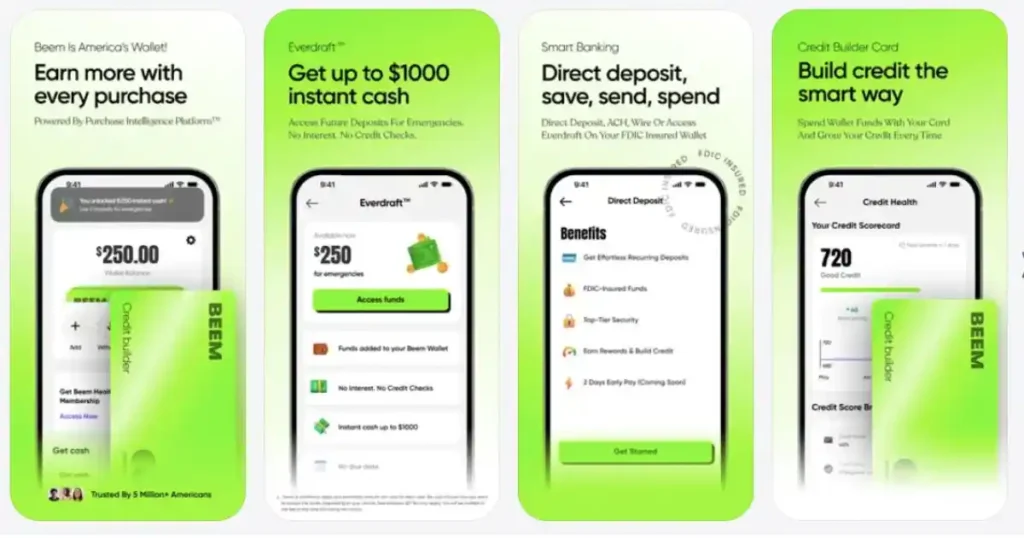
Our Help Center states Beem does not use a traditional password. Instead, users log in using a one-time verification code sent to their registered email or phone, and can also set up a PIN, Touch ID, or Face ID for added protection. This reduces the classic “reused password” problem that drives many account takeover incidents.
Biometric Access And Device-Level Protection
We publicly state that users can log in with Face ID or Touch ID for added safety. Biometrics do not solve every risk, but they are one of the strongest day-to-day protections against unauthorized access on a lost or shared device.
Monitoring And Alerts
We state that continuous monitoring flags unusual activity and access patterns. We also describe in our security-focused blog content that alerts can be tied to suspicious activity, login attempts, transfers, and account setting changes.
Monitoring matters because modern fraud is often behavioral. It is not always “someone logged in.” It is often “something about this login or transaction does not look like you.”
A Key Operational Claim We Make Publicly
On our Security page, we state that users’ personally identifiable data is never stored in our infrastructure. This is an important statement because reducing exposure reduces risk. The less sensitive data that is stored in places where it can be misused, the smaller the blast radius in a worst-case scenario.
People Also Read: How Beem Protects Against Fraud
Side-By-Side Comparison
| Security Area | Traditional Banks | Beem | What This Means For You |
| Identity verification | Varies by institution, often includes CIP/KYC and fraud checks | Real ID style verification described as government ID + live biometric selfie match | Strong onboarding reduces fake accounts and impersonation risk |
| Login and authentication | Often username/password + MFA, especially for high-risk actions | OTP-based login, optional PIN, Touch ID, Face ID | Less exposure to password reuse, plus device-level access controls |
| Security standards | Banks follow regulatory expectations and guidance | Security program based on NIST CSF, PCI-DSS, SOC 2, with third-party audits | Signals structured controls and ongoing security governance |
| Monitoring and anomaly detection | Most banks monitor fraud patterns and high-risk behavior | Continuous monitoring for unusual activity and access patterns, plus alerts described in Beem content | Earlier detection reduces the chance a small issue becomes a bigger one |
| Deposit protection | FDIC insurance at insured banks for eligible deposits | – | Deposit insurance is tied to the bank holding deposits, not the app brand |
| Account takeover risk | Persistent industry threat | Reduced by OTP login, identity checks, biometrics, monitoring | Your habits still matter: phishing and device compromise can bypass any platform |
Where Beem Can Feel Safer Than A Typical Bank Experience
This is not about claiming superiority. It is about recognizing where modern product design reduces common failure modes.
Passwordless Login Reduces Password Reuse Risk
Banks often support MFA, but many still rely on usernames and passwords as the primary credential. Password reuse is a major real-world weakness. Beem’s OTP-based login avoids the traditional password model described in our Help Center.
Strong Onboarding Verification Sets A High Bar Early
We describe identity verification with government ID and biometric selfie matching as part of onboarding. That type of friction is intentional. It is meant to make fake accounts harder to create at scale.
Clearer, App-Native Security Controls
Fintech apps can surface security features in a more user-visible way, like biometric login and security alerts. If users actually use the features, that often improves real-world safety.
Where Traditional Banks Often Have Strengths
Traditional banks have advantages too, especially in how the broader institution operates.
Long Operational History And Redundant Infrastructure
Banks have extensive redundancy, large security teams, and decades of experience handling fraud events. Even though fintechs can be very secure, banks have scale and institutional maturity.
Broad Customer Support Channels
Many banks have physical branches and long-established customer service escalation paths. That can be valuable in high-stress scenarios, especially for customers who prefer in-person support.
Wide Industry Coordination
Banks coordinate through long-established regulatory and industry channels, and they are directly supervised by bank regulators.
People Also Read: How FDIC Insurance Works in BEEM
What Matters Most: The Threat Model You Actually Face
For most consumers, the biggest risks are not “someone breaks encryption.” The biggest risks are:
- Phishing: someone tricks you into giving a code
- SIM swap: someone takes control of your phone number
- Lost device: someone accesses an unlocked phone
- Email compromise: someone uses email access to reset accounts elsewhere
These are human-layer risks. That is why modern digital banking guidance emphasizes layered authentication and customer awareness.
A Practical Beem Security Checklist
If you want the strongest protection, do these three things:
- Enable Face ID or Touch ID if your device supports it.
- Treat verification codes like cash. Never share them with anyone.
- Pay attention to alerts and unusual login or transaction activity, because early awareness is one of the strongest defenses.
The “Bank vs Fintech” Security Trap People Fall Into
A common mistake is assuming the word “bank” automatically means safer, and the word “fintech” automatically means riskier. In reality, most consumer losses today come from the same two threats across both worlds: social engineering (phishing) and account takeover. Attackers don’t care whether you’re using a legacy bank app or a fintech app. They care whether they can trick you into handing over access.
That’s why the security question shouldn’t be “is it a bank?” It should be: does the product reduce the most common takeover paths? In Beem’s case, our OTP-based login and optional PIN/biometric login are designed to reduce password reuse risk and make unauthorized access harder on the device layer. When you view security through the lens of real-world threats, you stop judging by labels and start judging by controls.
The Three Moments When Security Matters Most
Most people think security is something that matters “all the time,” but in practice, risk spikes at specific moments. If you understand those moments, you can protect yourself better, and you can also evaluate apps more intelligently.
Moment 1: Account Creation
This is where identity verification matters most. If onboarding is weak, fraudsters can create accounts at scale. Beem’s onboarding includes identity verification using a government-issued ID with a live biometric selfie match, which is designed to reduce fraudulent account creation.
Moment 2: Login And Recovery
This is where most takeovers happen. Our login system uses one-time verification codes instead of traditional passwords, and users can add PIN/Face ID/Touch ID as another layer. That matters because the riskiest accounts are the ones protected only by a reused password or a weak recovery flow.
Moment 3: Sensitive Changes And Money Movement
The most dangerous events aren’t always the first login, they’re what happens after: changing security settings, initiating transfers, or modifying account details. Beem describes real-time alerts tied to things like transfers, security setting changes, and suspicious activity so unusual behavior is easier to spot early.
A Simple “Is This Secure Enough?” Self-Test For Any Money App
If you want a fast way to judge whether an app is secure enough to trust, don’t start with buzzwords. Start with behaviors you can verify in 60 seconds. Here’s a simple self-test we recommend because it maps to the most common real-world fraud paths.
- Can I protect access without relying on a password? Beem uses one-time verification codes for login instead of traditional passwords, which reduces password-reuse risk.
- Can I add a device-level lock? If Face ID/Touch ID/PIN is supported, turn it on. Beem supports Face ID/Touch ID for added safety.
- Will I know quickly if something changes? Real protection includes visibility. Beem describes alerts for login attempts, transfers, and account or security setting changes so unusual activity is easier to catch early.
- Does the company explain security like a system, not a slogan? Beem publicly anchors its program to frameworks like NIST CSF, PCI-DSS, and SOC 2, which signals a structured approach rather than vague claims.
If an app can’t answer these basics, it doesn’t mean it’s unsafe by default, but it does mean you should be more cautious. Security isn’t what a company says. It’s what the product makes easy for you to do.
Conclusion
So, how secure is the BEEM app compared to traditional banks? The honest answer is that both can be secure when they use layered controls, strong authentication, verified identity, monitoring, and clear deposit infrastructure. Banks have regulatory maturity and long-established oversight.
Beem is built with a modern security posture that we publicly describe through recognized frameworks, passwordless OTP login, biometric support, identity verification, and continuous monitoring.
Security is not a slogan. It is a system. We built Beem to make that system visible and verifiable, so you can feel confident that protecting your account is not an afterthought; it is part of the product.
FAQs on How Secure is Beem
1. Is Beem As Secure As Traditional Banks?
Security depends on controls, not labels. Traditional banks follow strong regulatory expectations and layered authentication guidance, and Beem publicly discloses a layered security approach built on NIST CSF, PCI-DSS, and SOC 2, with third-party audits.
2. Does Beem Use Passwords?
Beem does not use traditional passwords. Our Help Center states you log in with a one-time verification code, and can enable PIN, Touch ID, or Face ID.
3. Does FDIC Insurance Protect Against Fraud?
FDIC insurance is designed to protect insured deposits if an FDIC-insured bank fails. It is not a general fraud insurance policy.
4. What Is The Most Important Thing I Can Do To Stay Safe?
Use biometric login if available, never share verification codes, and stay alert to suspicious messages. Account takeover often starts with stolen credentials or social engineering.