

Table of Contents
“Instant” is a promise people take literally, especially when money is tight. But instant transfers are really two clocks running at the same time: the Beem clock (how quickly we can approve and send the transfer once your setup is complete) and the bank network clock (how quickly your debit card network and your bank post the funds).
When both clocks move smoothly, BEEM instant transfer can feel truly instant. When one clock slows down, the experience can feel confusing, even though nothing is “wrong.”
This guide breaks down how Beem instant transfer works end-to-end: what it is, how fast it usually is, what needs to be set up first, what can delay it, and how to make it reliably fast when you actually need it.
What “Beem Instant Transfer” Means
On the BEEM app, an instant transfer typically refers to delivering money to a bank-issued debit card quickly, rather than sending it through a standard bank transfer route like ACH. Beem also offers a standard ACH option that is slower but free.
So when people ask “how fast is Beem instant transfer,” they’re usually asking:
If I choose instant delivery to my debit card, how quickly will the funds show up?
The realistic answer is: often within minutes for eligible users, but timing can still vary based on bank processing and whether your account and debit card are fully verified.
The Three Stages That Determine Speed
Stage 1: Account Setup
Before speed matters, eligibility and verification matter. If your bank account linking is still being verified, instant transfer is not the bottleneck yet. Bank account verification is often real-time, but in some cases can take up to 24–48 hours.
Stage 2: Debit Card Verification
Instant delivery requires a verified primary debit card linked to your primary bank account. Debit card verification typically takes up to 24 hours, and Beem uses a temporary $0.57 verification charge that is fully refunded once verification completes.
If your debit card is not verified, you may still be able to use non-instant options, but the debit card instant route will not behave like “instant.”
Stage 3: The Actual Transfer
Once setup is complete, the transfer itself can be fast. In Beem’s product guidance and current app-review documentation, instant delivery to your debit card is described as arriving within minutes for eligible users, while standard ACH delivery is free but takes three to five business days.
People Also Read: How Much Money Can I Get From BEEM
How Fast Each Delivery Option Is
Beem offers more than one way to receive funds, and the “fastest” option is not always the best option. Speed is a tradeoff: sometimes it costs more, sometimes it requires extra verification, and sometimes your bank’s processing speed matters.
Instant Delivery To Debit Card
This is the route most people mean by “Beem instant transfer.” When your debit card is verified and you’re eligible, the funds can arrive within minutes.
Standard Delivery To Bank Account (ACH)
ACH is designed for reliability, not speed. Beem’s standard transfer option is free and generally takes 3–5 business days.
Gift Card Option
Beem also lists a gift card option as a no-fee withdrawal option.
Beem Instant Transfer Fees: What You’re Actually Paying For
It’s important to separate two things:
- Your subscription plan (the “access” cost)
- The delivery method (the “speed” cost)
Beem’s pricing guidance describes instant delivery as optional and standard transfers as free.
How Much Is The Instant Transfer Fee?
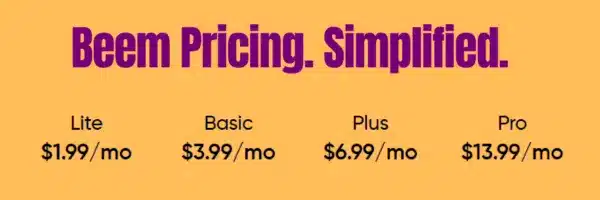
Instant transfer fees can vary by plan. In Beem’s current plan table, shown in its app review documentation, the instant transfer fee is listed as:
- Lite: $0.99
- Basic: $4
- Plus: $4
- Pro: $2
Beem also describes the instant debit card transfer fee as a flat per-transaction fee that is deducted from the withdrawal amount.
Why This Fee Matters More On Smaller Advances
A flat fee is transparent, but it hits differently depending on the amount you’re transferring. Beem’s own example makes the point clearly: on Basic or Plus, a $4 instant fee on a $20 withdrawal is effectively a large delivery surcharge relative to the amount.
That’s why the “complete breakdown” needs to include not only speed, but the speed-cost decision.
Why Beem Instant Transfer Might Not Feel Instant
When people say “instant transfer is slow,” the root cause is usually one of these. None of them are mysteries once you know what to look for.
Your Bank Account Or Card Is Still Verifying
Bank linking can be instant, but in some cases it may take up to 24–48 hours.
Debit card verification typically takes up to 24 hours. If either is still in progress, the fastest delivery route is not fully unlocked yet.
The Debit Card Is Not Eligible For Verification
Beem’s debit card verification process includes clear rules: it applies to the primary debit card linked to the primary bank account, and cards linked to secondary bank accounts cannot be verified.
It also notes prepaid cards and credit cards are not supported. If the card cannot be verified, instant delivery will not behave like instant.
Your Bank Posts Slower Than You Expect
Even when an instant transfer is sent immediately, the receiving bank can affect when it appears. This is not unique to Beem; it’s how debit rails behave across fintech.
You Changed Your Mind Mid-Flow
Beem gives you the ability to back out of a withdrawal until you provide consent and complete the ID/selfie verification step. That means you’re not forced into a transfer if you don’t like the fee you see at the last step, but it also means the transfer doesn’t exist until you complete that final consent.
People Also Read: Is BEEM Available in My State
The Best Way To Make Beem Instant Transfer Fast Every Time
Here’s the real playbook. It’s boring, but it’s what makes “instant” actually feel instant.
Verify Before You Need Money
People try to do verification when they’re already stressed. The fastest experiences happen when your bank and debit card are already verified, so there’s no waiting period when you actually need cash.
Keep Enough Balance For Verification
Debit card verification includes a temporary $0.57 charge. Beem explicitly notes to keep sufficient funds available to avoid verification failure.
Avoid Repeated Card Linking Attempts
Beem warns that repeated card linking attempts can delay verification and trigger multiple temporary verification debits.
Choose Speed Only When Speed Is Worth It
If you can wait, standard transfer is free and avoids the delivery fee entirely. If you can’t wait, instant delivery can be worth paying for, but you should make that decision consciously, not by habit.
Beem Instant Transfer Breakdown
| Delivery Option | Typical Speed | Cost | What You Need Set Up | Best For |
| Instant Delivery to Debit Card | Often within minutes (eligible users), timing can vary by bank | Fee varies by plan (example schedule shown in Beem’s plan table) | Verified primary debit card tied to primary bank account | True emergencies where timing matters |
| Standard Bank Transfer (ACH) | 3–5 business days | Free | Linked bank account | When you can wait and want $0 delivery cost |
| Gift Card | Not listed as “instant”; positioned as a no-fee option | No fees | Varies by flow | When you want a no-fee alternative |
Quick Cost Reality Check: “Instant” Is A Choice, Not A Default
The cleanest way to think about Beem instant transfer is:
- Standard delivery: free, slower
- Instant delivery: fast, optional fee
Beem intentionally separates the cost of access (subscription) from the cost of speed (delivery choice), so you can decide what’s worth it in the moment. That separation is important because it keeps pricing predictable and makes it easier to avoid “surprise” costs.
Business Days vs Calendar Days: The Timing Detail That Trips People Up
A lot of confusion comes from one simple mismatch: people hear “3–5 days” and assume weekends count. Standard bank transfers (ACH) are typically measured in business days, not calendar days.
So if you initiate a standard transfer late in the week, a weekend or bank holiday can make it feel slower even though it’s moving normally. The practical takeaway is simple: if the money is needed on a Saturday night, “free standard” and “fast” are not the same decision. Beem instant transfer exists for those moments when business-day timing doesn’t match real life.
Why Some “Instant” Deposits Hit Immediately And Some Take Longer
Even when a Beem instant transfer is sent quickly, the last mile is still your bank’s posting behavior. Some banks post incoming debit-card transfers almost instantly. Others may take longer to reflect the balance change, especially if they run internal checks or batch posting on their side.
That doesn’t mean the transfer failed. It usually means the transfer is in the “posted-by-bank” stage, not the “sent-by-Beem” stage. This is why the same instant transfer can look like “minutes” for one person and “a bit longer” for someone using a different bank.
The Status Language Guide: What “Pending” Usually Means
“Pending” is the most stressful word in money movement, so it helps to define it clearly. In most cases, it means one of three things:
- Verification pending: your bank account or debit card setup still needs to finish a verification step.
- Transfer in flight: the transfer has been initiated and is moving through the network, waiting for bank posting.
- Action incomplete: the flow wasn’t fully confirmed (for example, you backed out before the final consent step).
Knowing which bucket you’re in changes what you should do next. If it’s verification pending, the solution is to complete the setup. If it’s a transfer in flight, the best move is usually to wait for posting. If it’s an action incomplete, you’ll want to re-initiate the transfer when ready.
People Also Read: BEEM Approval Process Explained
A Simple “Is Instant Worth It?” Cost Reality Check
Because Beem instant transfer fees are flat (not percentages), the fee impacts small withdrawals much more than large ones. Here’s a simple reference that helps users make a smart decision without doing mental math in a stressful moment:
| Flat Instant Fee | $20 Transfer | $50 Transfer | $100 Transfer | $200 Transfer |
| $0.99 | 4.95% | 1.98% | 0.99% | 0.50% |
| $2.00 | 10% | 4% | 2% | 1% |
| $4.00 | 20% | 8% | 4% | 2% |
The practical rule: if you’re withdrawing a very small amount, standard delivery is usually the most cost-efficient choice when time allows. If timing is urgent, instant can still be worth it, but it should be a conscious tradeoff, not an automatic habit.
How To Make Beem Instant Transfer Feel Reliable Over Time
Speed is one thing. Reliability is what people actually remember. Here’s how to make Beem instant transfer more predictable over time:
- Keep your primary debit card stable: frequent card switching creates friction and increases verification rework.
- Maintain a small buffer: even tiny verification and processing steps can fail if your account is constantly at $0.
- Avoid repeated linking attempts: repeated retries can create delays and confusion in verification steps.
- Set up on a calm day: the best “instant” experience is the one you prepared for before the emergency.
This is the difference between “I needed cash and got stuck in setup” vs “I needed cash and it arrived.”
Conclusion
Beem instant transfer can be genuinely fast, but “instant” is only instant when the foundation is already built: linked bank account, verified primary debit card, and a clean account state.
Once that setup is done, the choice becomes simple and transparent. If you need speed, you can choose instant delivery and see the fee before you commit. If you don’t need speed, you can choose free standard delivery and avoid delivery charges altogether.
That’s the complete breakdown: instant when it needs to be, free when it can be, and clear enough that you’re never guessing what happens next.
FAQs on Beem Instant Transfer
1. How Fast Is Beem Instant Transfer?
When your account setup is complete and your primary debit card is verified, Beem instant transfer to a debit card can arrive within minutes for eligible users. Timing can still vary based on bank processing.
2. Why Is My Beem Instant Transfer Taking Longer Than Expected?
Most delays happen because bank account verification (sometimes up to 24–48 hours) or debit card verification (typically up to 24 hours) is still in progress, or because the debit card does not meet the verification rules for primary cards.
3. Is There A Free Option If I Don’t Need It Instantly?
Yes. Standard ACH transfer is listed as free and typically takes 3–5 business days. Beem also lists a gift card option as a no-fee withdrawal option.
4. How Much Is The Beem Instant Transfer Fee?
Fees can vary by plan. Beem’s plan table shows examples like $0.99 on Lite, $4 on Basic and Plus, and $2 on Pro. The instant fee is deducted from the withdrawal amount.
5. Can I Back Out If I Don’t Want To Pay The Instant Fee?
Yes. Beem allows users to back out of the withdrawal until they provide consent and complete ID/selfie verification.