
Table of Contents
Fraud prevention is not a “nice-to-have” in a money app. It is the foundation of trust. When you use Beem, you are not just moving money. You are linking accounts, verifying identity, accessing financial tools, and relying on us to help keep bad actors out.
That is why Beem protects against fraud using layers, not a single lock. We combine identity verification, secure login, encryption, bank-level authentication standards, and activity monitoring so account protection starts before money moves and continues while you use the platform.
This guide explains how that protection works in simple terms, what it is designed to stop, and what you can do on your side to make your account even harder to misuse.
Why Fraud Protection In Financial Apps Has To Be Layered
Unauthorized access rarely happens because of one dramatic failure. More often, it happens when multiple small gaps line up: weak login habits, incomplete verification, suspicious device activity, or a user not noticing something unusual fast enough.
That is why our security model is layered. On our public security page, we describe our security as being based on industry frameworks such as NIST CSF, PCI-DSS, and SOC 2, and we note that Beem maintains up-to-date security certifications through third-party auditors.
We also publicly describe Beem’s security approach as a combination of identity verification, encryption, monitoring, alerts, and access controls rather than a single-point defense. In simple terms, if one layer is tested, the others are still there to reduce risk.
People Also Read: How BEEM Secures Your Money
We Start With Identity Verification, Not Blind Trust
One of the most effective ways to reduce fraud is to stop fake or mismatched accounts before they become active.
On our Beem App Review page, we explain that account creation uses Real ID verification, which requires identity verification against a government-issued document matched to a live biometric selfie. We state clearly that this helps prevent fraudulent account creation and helps ensure each account belongs to a real, verified individual.
We also explain in our Help Center why we ask for your SSN: we use it to verify identity, comply with U.S. regulations, help keep accounts secure, determine eligibility for certain features like Everdraft™, and prevent fraud. That same article also states that this information is encrypted and handled securely.
This matters because a lot of fraud prevention is upstream. If identity checks are strong at account creation, it becomes much harder for impersonation, fake-account abuse, and early account takeover attempts to get traction.
Our Login System Is Built To Reduce Unauthorized Access
A surprising amount of account misuse starts at the login layer, which is why we do not rely on a simple old-style username-and-password setup.
Our Help Center states that Beem does not use a traditional password. Instead, users log in with their registered mobile number or email address and access the account through a one-time verification code (OTP) sent securely each time they sign in. We also let users set up a PIN, Touch ID, or Face ID for added account protection.
On our security page, we also state that users can log in with Face ID or Touch ID for added safety.
That combination matters. OTP-based access helps reduce the risk of a reused password being the single weak point, while biometric and PIN-based device protections make it harder for someone else to get into an already-linked account on your device.
Encryption Protects Data While It Moves And While It Is Used
Fraud prevention is not only about who logs in. It is also about what happens to your data in the background.
Our security is based on recognized frameworks, and we also state that users’ personally identifiable data is never stored in our infrastructure. Beem uses secure encryption and bank-level authentication standards to help protect connected financial accounts.
All data transmitted between your device and Beem’s systems is encrypted. Our recent Beem security blog similarly explains that Beem uses bank-level encryption for information sent between devices and servers, as well as for stored personal, financial, and transaction data.
That means encryption is one of the core barriers that helps keep sensitive information unreadable and less useful to anyone who should not have it.
People Also Read: How to Build Better Money Habits
We Monitor For Suspicious Activity, Not Just Successful Logins
A secure system does not stop at “you got in.” It also watches for unusual behavior after access begins.
In our Help Center, we state that we collect Beem app and website usage data to monitor fraudulent activities and mitigate risk. On the Beem App Review page, we state that continuous monitoring flags unusual activity and access patterns before they become problems.
Beem monitoring looks for unusual patterns, suspicious activity, and non-routine device behavior, and that alerts can be triggered for transfers, account setting changes, related account activity, login attempts, or suspicious behavior.
That is a key part of how Beem protects against fraud in practice. Fraud is not always “someone got your password.” Sometimes it is a suspicious login context, an unusual transfer pattern, or account behavior that does not match the normal pattern. Monitoring helps us spot those signals earlier.
We Use Secure Account Linking As A Control, Not Just A Convenience
Linking a bank account is not only about turning on features. It is also part of building a safer account environment.
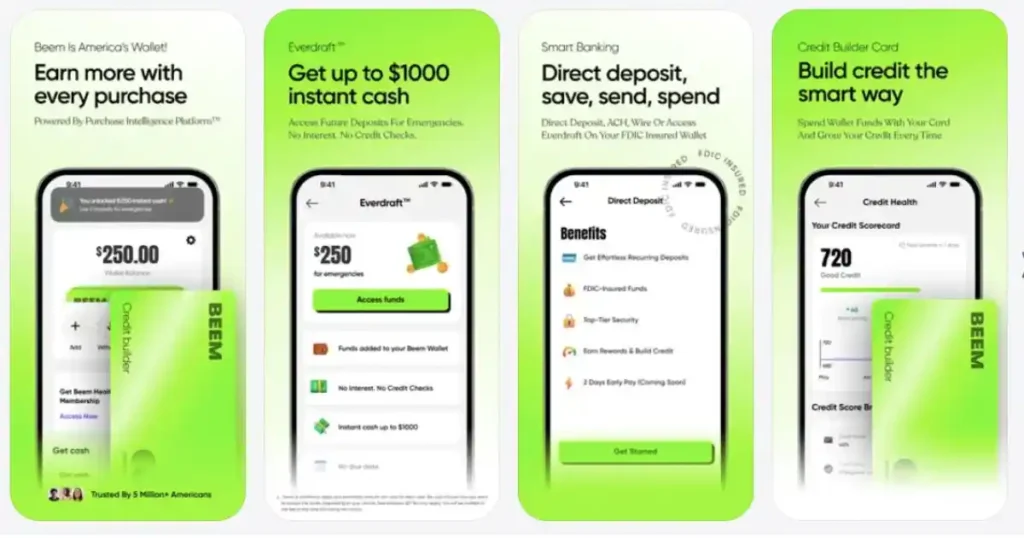
Linking your bank account with Beem is quick and secure, and that linking allows Beem to verify eligibility, personalize your qualification amount, and unlock features that depend on account activity. For a bank account to qualify as a primary account, it must have at least 6 months of transaction history, which is part of the eligibility.
That kind of requirement is not just about qualification. It also helps reduce weak or low-context account setups that are harder to evaluate safely. A stable, active primary account gives us a clearer picture of normal behavior, which supports both better eligibility decisions and stronger fraud detection context.
What Our Fraud Controls Are Designed To Prevent
When people hear “security,” it can feel abstract. Here is the practical version. Beem’s identity and device-aware checks are designed to help prevent:
- fake or duplicate accounts
- identity impersonation
- automated fraud attempts
- unauthorized account access
That is the clearest way to think about what our protection layers are trying to do. Some layers are there to stop bad accounts from being created. Some are there to reduce account takeover risk. Some are there to make suspicious behavior easier to detect before it becomes a financial loss.
No platform can honestly promise that fraud risk is zero. But a serious platform can make abuse much harder, detect more of it faster, and reduce the blast radius when something looks wrong. That is the standard we aim for.
What You Can Do To Strengthen Your Beem Account Even More
Good security is a partnership. We build the protective layers, but a few user habits make those layers stronger.
We specifically recommend using device security features such as Face ID or fingerprint login, and avoiding accessing financial apps on public Wi-Fi networks. Since our login system supports PIN, Touch ID, and Face ID, enabling those options is one of the easiest ways to reduce unauthorized access risk on a shared or lost device.
A smart Beem security routine looks like this:
- Turn on Face ID, Touch ID, or PIN if your device supports it.
- Use the same primary device consistently where possible, so unusual-device activity stands out more clearly.
- Avoid logging into sensitive financial apps on unsecured public Wi-Fi.
- Pay attention to alerts, especially for logins, transfers, or account-setting changes.
Those steps are simple, but they meaningfully reduce your exposure.
People Also Read: How Cash Advance Apps Protect Your Data
What Beem’s Fraud Protection Does Not Mean
It is also important to be honest about the boundaries. Fraud controls, encryption, monitoring, and identity checks make your account harder to misuse. They do not mean users should ignore basic caution. If someone hands over a code, uses an unsafe device, or ignores a suspicious alert, no platform can completely erase that risk.
The right expectation is this: Beem is designed to make fraud harder, unauthorized access less likely, and suspicious behavior more visible. Our job is to build strong controls. Your job is to use the account with the same level of care you would use for any serious financial tool.
What To Do The Moment Something Feels Off
One of the most useful parts of fraud protection is not just blocking bad activity. It is helping you spot unusual activity early enough to act. Beem sends alerts for key actions such as transfers and transactions, account or security setting changes, related account activity, and login attempts or suspicious activity. That matters because early awareness is often what turns a small issue into a contained one instead of a bigger loss.
If something feels wrong, the best move is to treat it as urgent but manageable. Start by reviewing the most recent alerts and checking whether the activity matches something you actually did. If it does not, treat that as a signal to secure your access immediately by using the protections already built into your account, such as OTP-based sign-in and device-level protections like PIN, Touch ID, or Face ID. Beem’s Help Center confirms that Beem does not use a traditional password and that users sign in with a one-time verification code, with optional PIN/biometric protection for added account security.
This adds real value for readers because fraud prevention is not only about what Beem does in the background. It is also about how quickly a user responds when something unusual appears. Fast awareness plus fast action is one of the strongest practical defenses.
How Beem’s Fraud Protection Layers Work Together
| Protection Layer | What It Does | Why It Matters |
| OTP-Based Login | Beem uses a one-time verification code instead of a traditional password for sign-in. | This reduces the risk of a reused or stolen password being the single point of failure. |
| PIN, Touch ID, or Face ID | Users can set up a PIN, Touch ID, or Face ID for added account protection. | This adds another barrier if someone gets hold of your device. |
| Identity Checks | Beem requires SSN to verify identity, comply with U.S. regulations, help keep the account secure, determine eligibility for some features, and prevent fraud. | Strong identity verification helps reduce fake accounts and impersonation risk. |
| Data Monitoring | Beem collects app and website usage data to monitor fraudulent activities and mitigate risk. | Monitoring helps detect suspicious behavior that may not look normal for the account. |
| Real-Time Alerts | Beem alerts can cover transfers, transactions, account/security setting changes, related activity, and login attempts or suspicious activity. | Alerts help users spot problems early and respond before more damage happens. |
| Security Frameworks | Beem security is based on NIST CSF, PCI-DSS, and SOC 2, with up-to-date certifications by third-party auditors. | This shows the security model is built on recognized industry standards, not ad hoc controls. |
Conclusion
Fraud prevention on the Beem app is not built around one promise or one feature. It is built around layers that work together.
We verify identity before accounts become active. We use OTP-based login and optional biometrics to reduce unauthorized access risk. We encrypt transmitted data, apply bank-level authentication standards, and monitor for unusual activity patterns that may signal fraud or misuse.
That is what “Beem protects against fraud” should mean in practice: not vague reassurance, but visible safeguards, clear account controls, and a system designed to make bad actors work much harder while helping legitimate users stay protected.
People Also Ask
1. How Does Beem Protect Against Fraud?
BEEM uses a layered security model that includes identity verification, encrypted data transmission, secure login with OTP, biometric login options, bank-level authentication standards, and ongoing monitoring for unusual activity and access patterns.
2. Does Beem Use Passwords?
Not in the traditional sense. Our Help Center states that Beem does not use a traditional password; instead, users sign in with a one-time verification code sent securely to their registered mobile number or email. Users can also set a PIN, Touch ID, or Face ID for added account protection.
3. Why Does Beem Ask For My SSN?
We ask for your SSN to verify identity, comply with U.S. regulations, help keep your account secure, determine eligibility for some features like Everdraft™, and prevent fraud. Our Help Center also states that this information is encrypted and handled securely.
4. Does Beem Monitor For Suspicious Activity?
Yes. We publicly state that we collect app and website usage data to monitor fraudulent activity and mitigate risk, and we also state that continuous monitoring flags unusual activity and access patterns.
5. What Should I Do To Make My Beem Account Safer?
The best next steps are to enable biometric or PIN-based device security, avoid using public Wi-Fi for financial app access, and pay attention to alerts for suspicious activity or account changes.